How to deploy a Laravel app to Cloud
Push to Git and ship a production-ready Laravel application in minutes without stitching together different services. Every building block is included and works together out of the box, including managed databases, WebSockets, queues, and infrastructure that scales to zero when idle.
Before you start
What your app needs
- Laravel 9.x or greater (latest minor version of each release; see the deployments docs for exact minimums)
- PHP 8.2, 8.3, 8.4, or 8.5 (PHP 8.5 is the default for new environments)
- A Git repository on GitHub, GitLab, or Bitbucket
- A Laravel Cloud account
What you do not need
- A Dockerfile
- A Procfile or buildpack configuration
- A separate CI pipeline for deploys (though deploy hooks work if you already have one)
- A separate database provider
- A separate WebSocket provider
- A certificate authority for TLS
Connect your repository
- From your Laravel Cloud dashboard, click + New application. Cloud opens the Git provider connection flow.
- Pick GitHub, GitLab, or Bitbucket, authenticate, and choose which user or organization repositories to expose.
- Return to Cloud, pick a repository and branch, name your application, choose a region, and click Create Application.
Cloud analyzes the repository as it creates your application. If it detects a monorepo, it identifies every supported framework it finds (Laravel, Next.js, Nuxt, Symfony, and others) and prompts you to pick which directory to deploy. A repo with a Next.js frontend and a Laravel API, for example, will surface both, so you can deploy them as separate applications. All sibling directories stay accessible during the build, so shared packages keep working, but Cloud only deploys and runs the selected directory.
Choose your runtime
- In your environment settings, confirm the runtime is set to PHP. If you're deploying applications in other languages, confirm their runtime is also set properly.
- Select the version your application requires. Cloud supports PHP 8.2 through 8.5, and defaults new environments to 8.5. Selecting a version and re-deploying is a one-click change.
| Framework | Runtime |
|---|---|
| Laravel | PHP 8.2-8.5 |
| Symfony | PHP 8.2-8.5 |
| Next.js | Node.js 20/22/24, Bun 1.2, Deno 2.2.6 |
| Nuxt | Node.js 20/22/24, Bun 1.2, Deno 2.2.6 |
| Ruby on Rails | Version TBD |
| Python (Django, Flask, FastAPI) | Version TBD |
| Go | Version TBD |
Add the infrastructure your app needs
Every Cloud environment has an infrastructure canvas: a visual dashboard of the resources attached to your app. This is where you provision databases, caches, queues, WebSockets, and object storage. Everything you attach here gets its connection credentials injected into your app's environment variables automatically, so you never wire up connection strings in code.
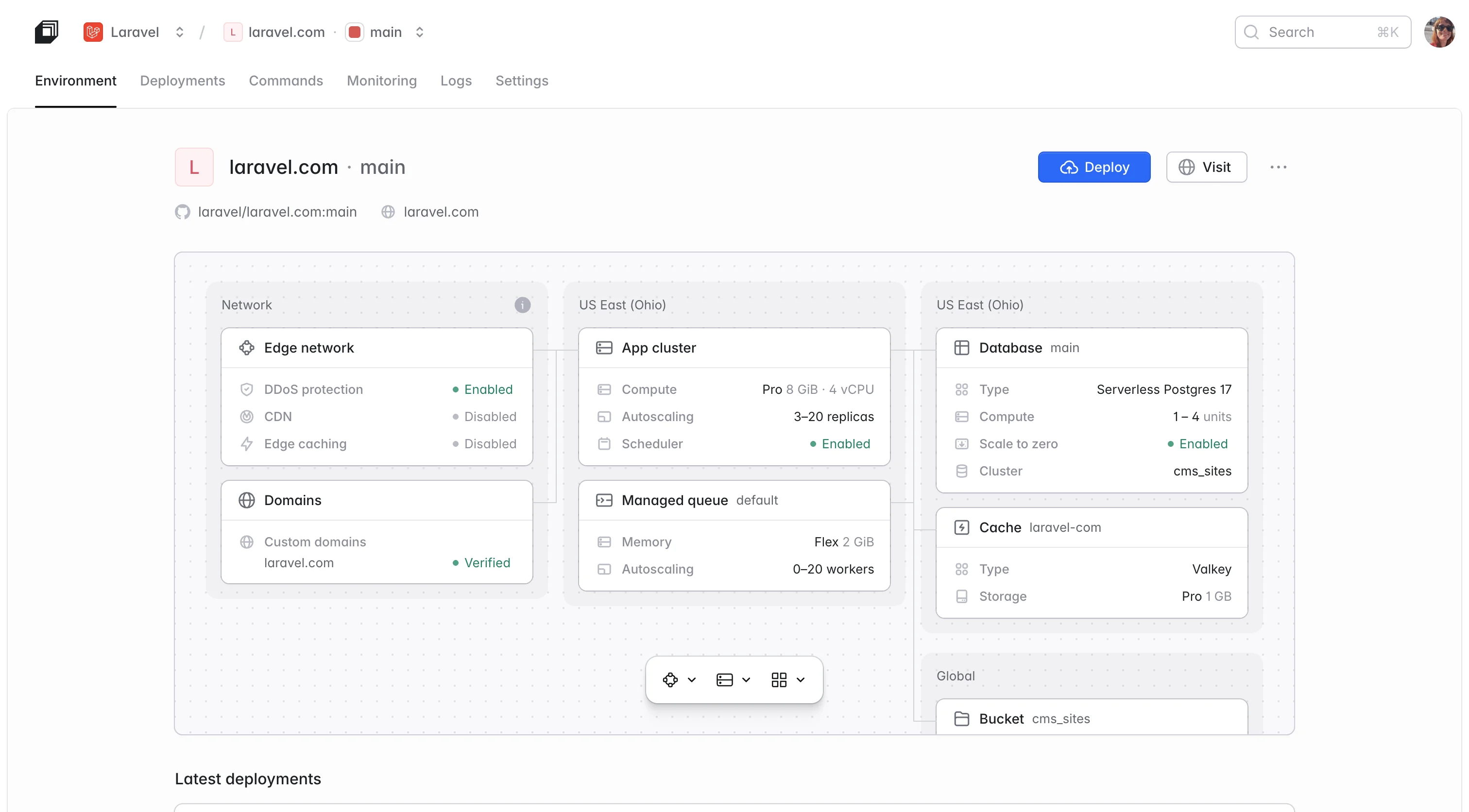
Before Cloud makes any change, you see exactly what is happening: the variables it will inject, any it recommends you add on top, and a warning if attaching this resource would overwrite existing values (for example, swapping your cache driver). Nothing changes silently.
A database
- Click Add database on the canvas and pick Serverless Postgres or Laravel MySQL. Cloud provisions the database and injects DB_HOST, DB_USERNAME, DB_PASSWORD, and DB_DATABASE into your environment. Nothing to configure in config/database.php; Laravel picks up the injected values on the next deploy.
Serverless Postgres autoscales compute and storage, supports pgvector for AI and vector similarity workloads, and can scale to zero when idle (waking in a few hundred milliseconds on the next query). Laravel MySQL is fully managed with automatic backups. Both come with connection pooling and support up to 10,000 concurrent connections.
Cache, sessions, and a queue backend
- Click Cache on the canvas and pick a key-value store. Cloud injects CACHE_STORE, REDIS_HOST, and REDIS_PASSWORD, so Laravel's cache, session, and queue drivers work without further configuration.
Laravel Valkey is a Redis-compatible KV store that starts at 250 MB, supports up to 10,000 concurrent connections, auto-upgrades as your usage grows, and scales to zero on Flex sizes.
Real-time and WebSockets
If your app broadcasts events (chat, live dashboards, presence indicators, notifications), you need a WebSocket server. On most platforms, this means running Reverb, Soketi, or a paid Pusher plan yourself and monitoring the process. On Cloud, WebSockets are a resource on the canvas.
- Click Add resource > WebSockets, pick a region and a concurrent-connection ceiling, and Cloud provisions a fully managed Laravel Reverb cluster. It injects both the server-side variables (REVERB_APP_ID, REVERB_APP_KEY, REVERB_APP_SECRET, REVERB_HOST) and the frontend variables Laravel Echo needs (VITE_REVERB_*) on every deploy. The cluster is Pusher-protocol compatible, so private channels, presence channels, and client events all work out of the box.
Queues
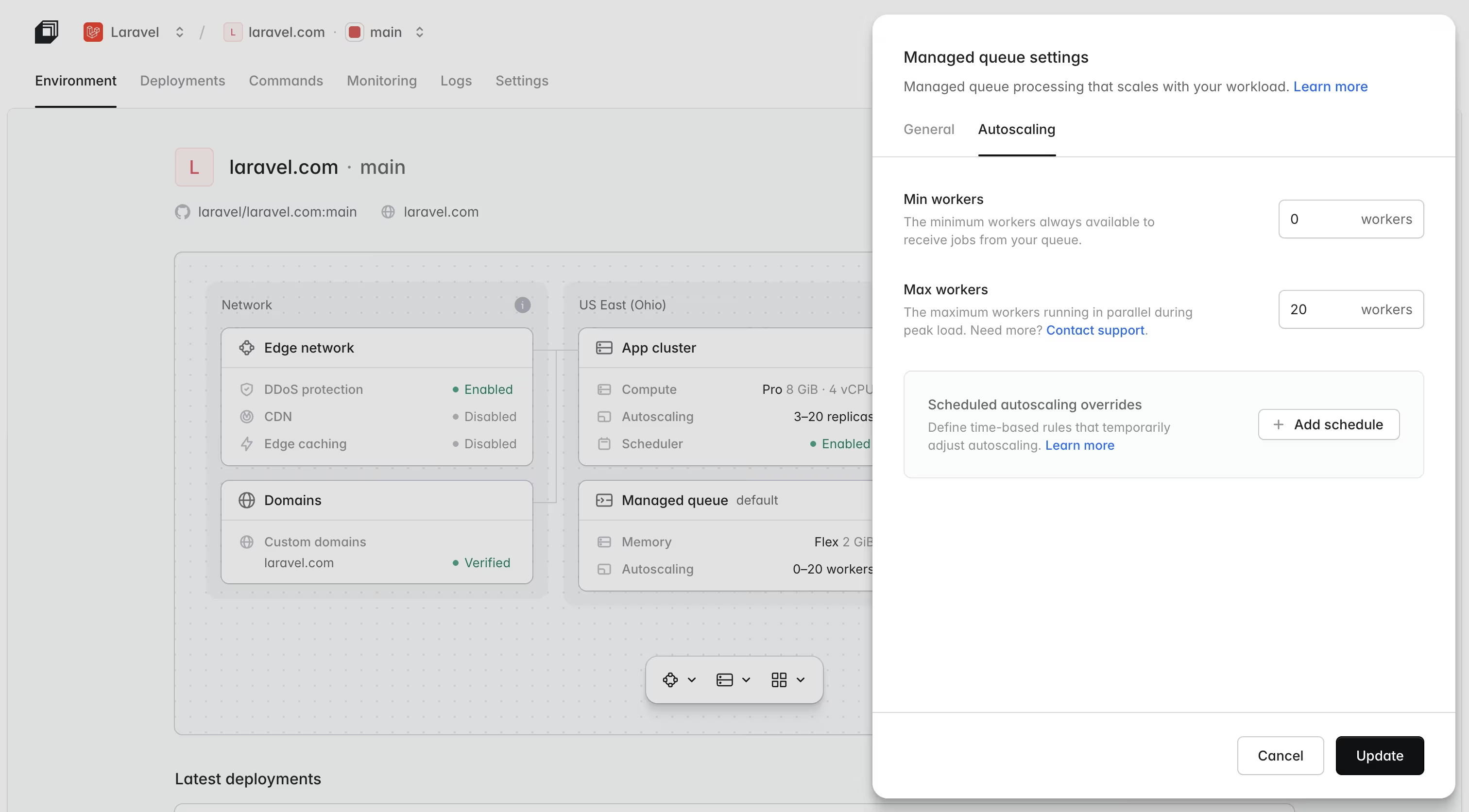
Laravel Cloud runs your queue workers for you.
- On the canvas, attach a Queue resource and Cloud gives you managed queues: dedicated workers that scale with the size of your backlog, including scaling to zero when the queue is empty. Failed jobs surface in a built-in retry dashboard.
File and object storage
- Add Object storage on the canvas for an S3-compatible bucket.
- Update config/filesystems.php to use the Laravel Object Storage disk and your uploads work without an AWS account or a hand-written IAM policy.
Scheduled tasks
Laravel's scheduler works unchanged on Cloud.
- Register your commands in routes/console.php as usual. Scheduled tasks keep running even when your environment scales to zero, so daily digests and cleanup jobs fire on quiet apps too.
Set your build and deploy commands
- In your environment's Settings, review the build and deploy commands. Laravel Cloud pre-populates sensible defaults (a version of the commands below) when it detects a Laravel app, so most projects can leave them as-is:
The build command installs dependencies and compiles your frontend assets, and it is also where caching or optimization steps like php artisan optimize belong. The deploy command runs against your production database on every release, so it is the right place for migrations and any post-release task that needs to touch a live database.
Then add your environment variables. Cloud generates an APP_KEY and injects it into your environment automatically on the first deploy, so you do not have to run php artisan key:generate yourself. If you would rather set your own, generate one locally and paste it into your environment variables:
php artisan key:generate --showAny resource you attached on the canvas (database, cache, WebSockets, object storage) already has its credentials injected. You only need to set application-specific values: third-party API keys and anything else your app reads from .env that isn't already covered by an attached resource.
Deploy
Click Deploy. Here is what Laravel Cloud does:
- Pulls your code at the current commit.
- Builds a Docker image configured for your PHP version.
- Runs your build command inside that image.
- Brings up the new deployment alongside the old one.
- Runs your deploy command against the production database.
- Drains traffic from the old deployment gracefully, letting in-flight requests finish.
- Routes new traffic to the fresh deployment.
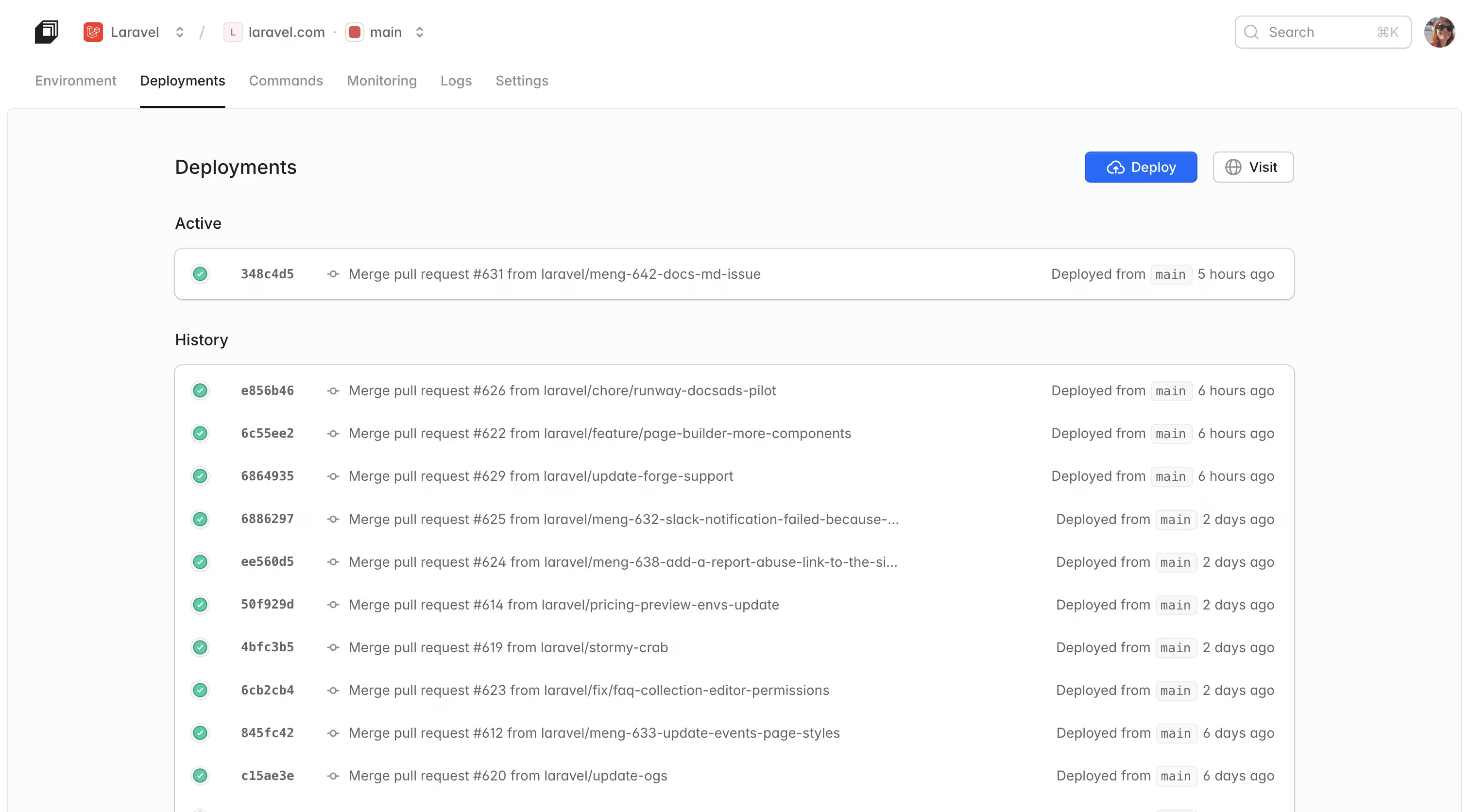
You get a .laravel.cloud URL as soon as the deployment goes green. From here on, every push to your connected branch automatically triggers a new deploy. Push-to-deploy is on by default, and you can swap it for a manual deploy hook if you want CI to control the trigger.
Add your production domain
In the Cloud dashboard, go to Domains and add your custom domain. Cloud gives you the DNS records to set (A or CNAME depending on your setup). Once DNS propagates, Cloud provisions TLS certificates automatically, and they renew on their own. You will not touch a certificate again.
Not ready for a custom domain yet? Every application ships with a free .laravel.cloud vanity domain that you can rename to any available subdomain (for example, myapp.laravel.cloud) right from the dashboard. See Domains.
What you'll grow into
Once your app is live, the rest of the platform is waiting on the same dashboard. You do not need to configure any of this on day one, but knowing it is there changes how you build.
- Preview environments. Every pull request gets its own fully isolated stack (application, database, cache, everything), torn down when the PR merges or closes. Your team reviews changes against a production-like environment before shipping.
- Autoscaling and scale-to-zero. Set a minimum and maximum replica count and Cloud scales your app to match traffic. Staging environments scale to zero when idle and wake in under 500 milliseconds when a request arrives.
- Edge network with DDoS protection. Cloud partners with Cloudflare for globally distributed edge caching and DDoS mitigation, applied to every application without configuration.
- Logs and metrics. Search your application logs and view CPU, memory, and Laravel Object Storage metrics in the dashboard.
- Cloud observability. Laravel-native application performance monitoring, purpose-built for the framework rather than adapted from a generic APM solution. Available with one click in the Cloud dashboard.
- Private Cloud. For regulated workloads (HIPAA under BAA, SOC 2 Type 2 attested), Cloud provisions your applications inside a dedicated AWS account and VPC with private networking to your existing infrastructure, dedicated outbound IPs, and managed RDS and ElastiCache inside the boundary.
Your Laravel app is live on Cloud!
You now have a production-ready Laravel application running on managed infrastructure, with autoscaling, a production domain, and every resource your app needs already wired up.
From here, every push to your connected branch ships a new deploy automatically, and the rest of the platform, preview environments, observability, and Private Cloud, is ready whenever you need it.
Coming from another host?
If you have an existing Laravel app running somewhere else, the migration guides walk through the specifics of moving without downtime.
Before you start
Frequently asked questions
Most first deploys take under 15 minutes end to end: connecting the repository, attaching a database and cache, setting environment variables, and running the first build. Subsequent deploys are typically a minute or two.
No. Cloud automatically detects a Laravel application in the repository and builds it for the PHP version you select. Frontend build commands and deploy commands live in your environment settings, not in a Procfile.
Every resource you attach on the infrastructure canvas has its credentials injected automatically as environment variables. Laravel picks them up on the next deploy. You do not paste connection strings into .env or config/database.php.
Queue workers run as managed queues by default: dedicated workers that scale with the backlog, including to zero when idle. Laravel's scheduler runs on Cloud unchanged and continues to fire even while your environment sleeps.
Yes. Preview environments provision a fully isolated stack for every pull request and tear it down when the PR merges or closes.
Cloud deploys Laravel, Symfony, Next.js, Nuxt, Ruby on Rails, Python (Django, Flask, and FastAPI), and Go, with Java (Spring Boot) support in progress. PHP, JavaScript (Node.js, Bun, Deno), Ruby, Python, Go, and Java runtimes are all supported.
Yes. Cloud has first-class monorepo support. Each application in a monorepo becomes a separate Cloud resource with its own environment, scaling, and domain, even when it shares a repository with other applications.
Autoscaling brings up additional replicas within the range you configure. Cloud's edge network absorbs the initial burst at the CDN layer and applies DDoS protection to suspicious traffic patterns.
Yes, through Laravel Private Cloud. Your applications deploy into a dedicated AWS account and VPC operated by Laravel, with private networking to your existing infrastructure. Suitable for regulated workloads, including HIPAA.
Cloud provisions a fully managed WebSocket cluster (powered by Laravel Reverb) as a resource on the infrastructure canvas. Server-side and frontend environment variables are injected automatically, so private channels, presence channels, and Laravel Echo work without external configuration.