Every Laravel application carries the same standing risk: an unpatched dependency, a misconfigured header, an audit log nobody finished wiring up. On a self-managed server, closing those gaps is a job you own, one more thing to schedule, configure, and remember on top of shipping features.
With Laravel Cloud, that job is already done for you, running before you ever push a commit. That's fewer hours spent on infrastructure and more on the product you're actually trying to ship. Read more about Cloud’s security and compliance.
Laravel Security Best Practices Built Into the Framework
Before Laravel Cloud even enters the picture, the Laravel framework has already done a lot of the security work. Submit a form like a login or comment, and Laravel checks the CSRF (cross-site request forgery) token without you writing a line of validation. Query the database with Eloquent, and the bindings rule out SQL injection as a side effect of writing normal code. None of it is hosting-related. It's just what happens when you build on Laravel:
- CSRF tokens validate every state-changing form submission.
- Blade escapes output by default to block XSS (cross-site scripting), so a comment field can't inject a script that runs in another visitor's browser.
- Eloquent's query bindings rule out SQL injection through normal use, since user input is never concatenated directly into a query.
- The
Hashfacade handles password hashing with bcrypt or Argon2, so nobody stores plaintext by accident. - Mass assignment protection stops a stray input field from overwriting a column it should not touch.
- Signed URLs let you share time-limited links without building a token system from scratch.
That protection follows your code wherever it runs. Laravel Cloud picks up from there, securing everything around your code by default, starting at the edge, before a request ever reaches your application.
Traffic That Never Touches Your App Directly
Laravel’s hosting security starts before a request ever reaches your code. Laravel Cloud runs your application on AWS, with Cloudflare serving as the network layer in front of it. That means every request hits Cloudflare's edge first, gets filtered there, and only then reaches your compute cluster. Your application is never directly exposed to the public internet.
The security defaults that ship with every Cloud app, without configuration:
- DDoS mitigation: Traffic floods and amplification attacks are absorbed at the edge across every plan, including Starter.
- Web Application Firewall: Cloudflare's OWASP Core Ruleset filters common injection, authentication, and data exposure attacks before they reach your app. Business plans add bot categories, custom rate-limit thresholds, and automatic blocking of abusive traffic patterns.
- Rate limiting: The default policy intercepts requests from any IP that exceeds 100 requests per minute. You can raise, lower, or replace the rule from the dashboard if you’re on the Growth or Business plan.
- Security response headers:
X-Frame-Options: DENY,X-Content-Type-Options: nosniff, andStrict-Transport-Securityare applied automatically on every response.
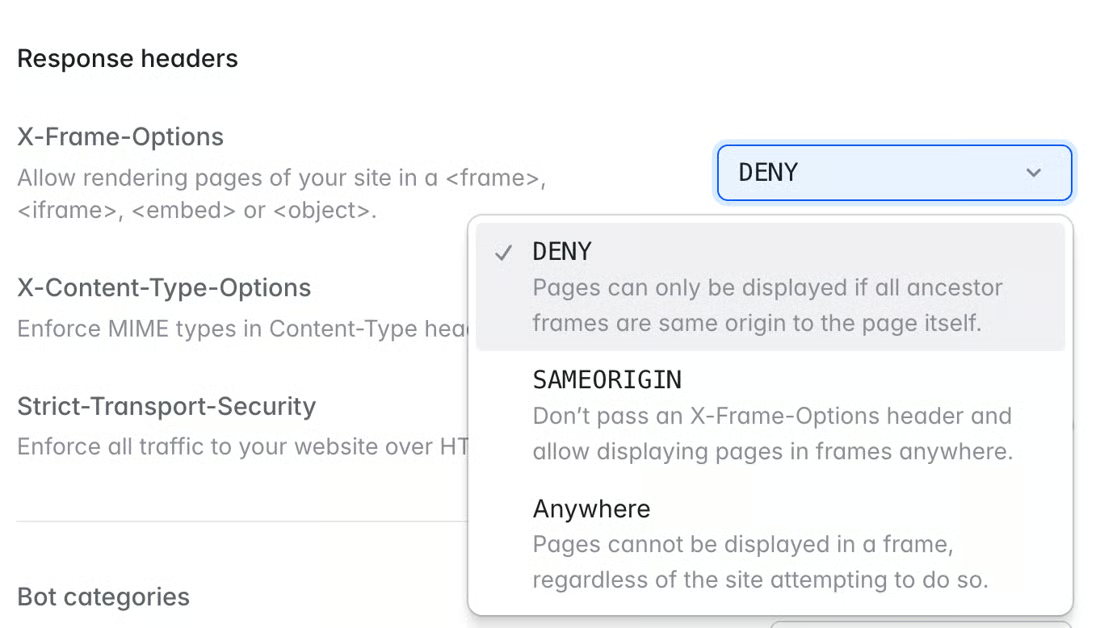
- Automatic Transport Layer Security: SSL (secure sockets layer) certificates are provisioned the moment you connect a custom domain and renewed continuously, with no expiry calendar to keep.
In practice, that means a traffic spike or a bot attack is Cloudflare's problem to absorb, not a 2 a.m. page for whoever's on call. Full details for each layer live in the Laravel Cloud network documentation.
Cloud Handles Patching and Isolation for You
Earlier this year, PHP shipped a fix for a common vulnerability and exposure (CVE-2026-6722). Rated a 9.5 out of 10 in the Common Vulnerability Scoring System, this was a remote coding execution flaw in PHP’s SOAP extension.
Proof-of-concept exploit code began circulating within days of the advisory. On a self-managed VPS, the work to close that window is yours; read the advisory, schedule a maintenance window, test in staging, and roll the binary across every server.
On Laravel Cloud, PHP security patching runs on the platform’s own schedule, on top of AWS, with no maintenance window to coordinate around. In Laravel Cloud, tenant isolation is enforced within Kubernetes using namespaces and network policies; in Private Cloud, it's enforced at the infrastructure level.
The platform also monitors compute clusters for anomalous PHP execution patterns, flagging behavior that appears to be exfiltration, in-memory webshell installations, or unexpected outbound connections.
For teams that need stronger isolation guarantees, Laravel Private Cloud provisions a dedicated Kubernetes cluster, dedicated compute nodes, and a private Virtual Private Cloud inside an AWS account managed by the Laravel Cloud team.
Outbound traffic exits through dedicated NAT (network address translation) gateways with static IPs, which makes IP-based allowlisting and compliance traceability practical for the first time. Every workload runs on its own tenant, so there is no noisy-neighbor problem to manage.
If you're an agency running a dozen client apps on the same platform, this isolation is what keeps a problem in one client's app from ever becoming a call you have to make to your other clients.
Audit Logs and Access Control That Pass the Procurement Test
Isolation and monitoring solve the technical half of security. The other half is proving it to the people who have to sign off before your app goes anywhere near their compliance checklist.
A Laravel security audit from a procurement team is usually where deployments stall. Laravel Cloud is SOC 2 Type II attested across security, confidentiality, and availability, with built-in GDPR and CCPA compliance, HIPAA, and ISO 27001.
Alongside these compliance certificates, the Laravel Cloud platform provides:
- Encryption at rest and in transit: every application, database, and backup is encrypted by default with no flag to flip.
- Single sign-on and SAML: connect Laravel Cloud to the identity provider your company already uses, so credentials never sprawl into another vendor.
- Role-based access control: custom roles, resource-level permissions, and visibility into who has access to what.
- Detailed logs of every action: every change in the dashboard, the Laravel Cloud API, or the CLI is logged and available to satisfy auditors and internal security review.
- Automated backups: managed databases are backed up on a continuous schedule, with point-in-time recovery on supported tiers.
Visit the Laravel trust center to download attestation letters and current reports without filing a ticket. Combine that with Laravel Chronicle on the application side if you need a tamper-evident, cryptographically chained log of business events on top of platform logs of Laravel Cloud security.
Catching Vulnerable Packages Before They Ship
Audit trails tell you what happened after the fact. Catching a problem earlier means monitoring the dependencies that make their way into your app in the first place.
In 2025 alone, more than 400 PHP package vulnerabilities were added to the PHP Security Advisories Database. Most Laravel vulnerabilities that reach production started as a dependency that nobody rechecked after the initial install. The community standard for catching them locally is composer audit, which scans your composer.lock against the advisories database and exits with a non-zero status on a match.
Laravel Cloud automatically runs the equivalent check at deploy time for you. When you push code, the platform inspects the packages your codebase ships with and flags any that match active security advisories before the deploy completes. If a transitive dependency in your composer.lock ships with a known vulnerability, you see it in the dashboard, not in an incident report from someone else.
That deploy-time check would not catch a zero-day tag rewrite on the day it occurs, since the advisory would not yet exist. It does mean, though, that the moment a package gets a CVE, your next deploy tells you about it instead of waiting on a researcher's email.
Let Laravel Cloud Secure Your App
WAF rules, patch schedules, audit log pipelines, and dependency reviews used to be a quarterly initiative. With Laravel Cloud, they're just how secure deployments behave by default. Laravel Cloud runs all of it for you, backed by SOC 2 Type II, so the parts of security testing that used to eat a sprint now run unnoticed in the background.
This results in less time spent maintaining infrastructure, fewer surprises for you or your customers, and, if you're managing client work, one fewer way someone else's mistake becomes your liability.
When you are ready to see what running on a hardened platform looks like, try Cloud—the first month on the Starter plan is free. Talk to our team about the Enterprise plan or Laravel Private Cloud if you have specific procurement or isolation requirements.
If you want to start with the community-side review first, point Moat at your GitHub account before your next deploy.