We recently announced that your Laravel Cloud stack now scales to zero and wakes 20x faster. This post covers how we built it.
The original implementation of scale to zero on Cloud had a 10-second wake time, long enough for users to notice. Adding database and cache startup on top would have made it worse, so most apps kept them running around the clock.
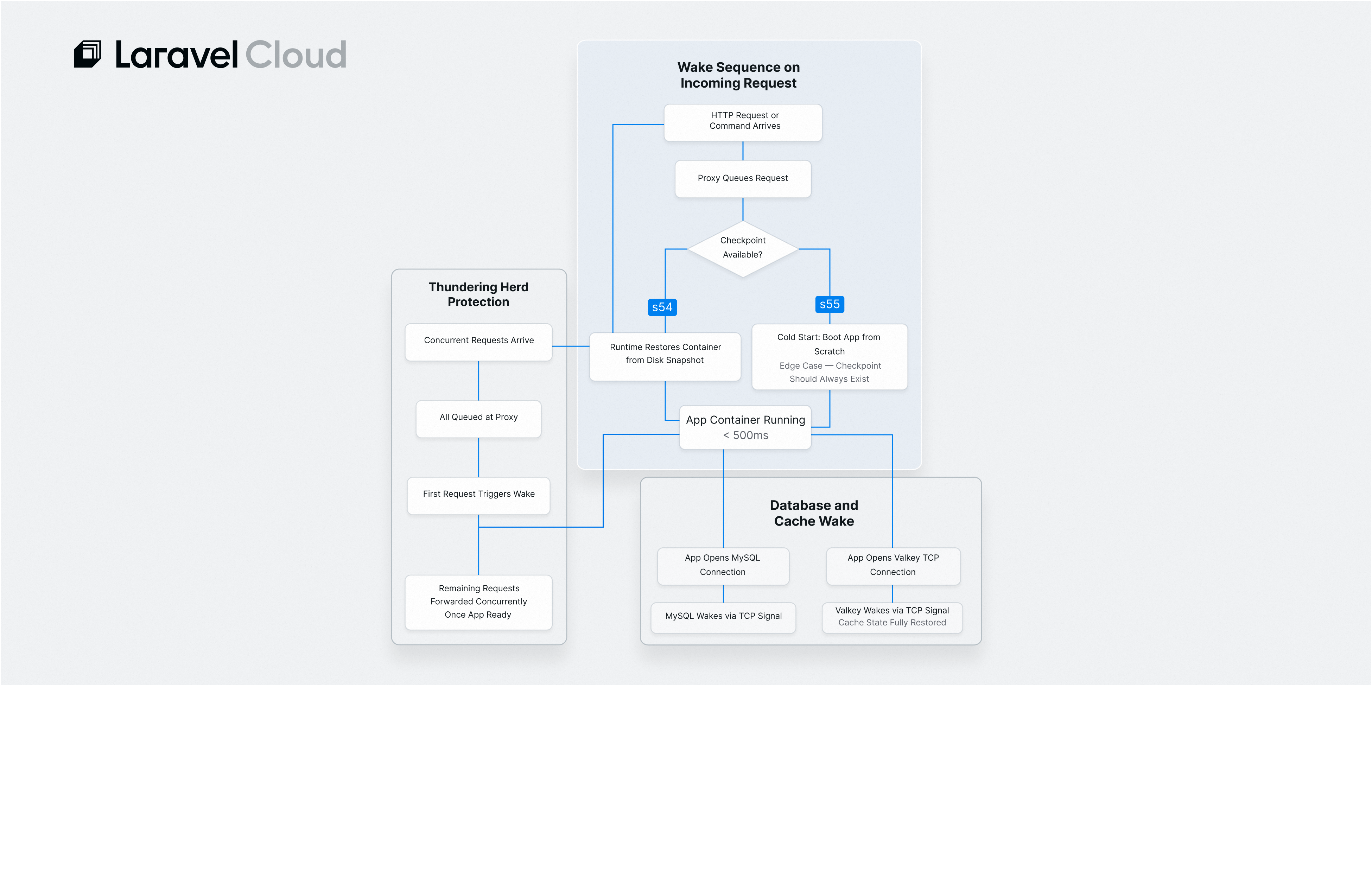
The new scale-to-zero Flex compute uses checkpoint/restore. So instead of a cold boot on every request, the runtime saves the full in-memory state to disk and restores it instantly. Wake time drops to under 500 milliseconds. Now your whole stack, including databases and cache, can sleep and wake as a unit.
To learn how we achieved this, keep reading, or check the Laravel Cloud docs if you want to get started first.
Why the Old Scale to Zero Was so Slow
In our original scale-to-zero architecture, sleep meant removal. When your app went idle, it was completely removed from the compute cluster. The next incoming request hit a proxy, which then had to schedule a workload onto a compute node, pull the app image, and start all the processes from scratch.
That process took about 10 seconds, which meant any app with real traffic could not fully take advantage of the scale to zero benefits. Compute slept, but everything else kept billing.
Checkpoint/Restore: Why Wake Times Dropped 20x
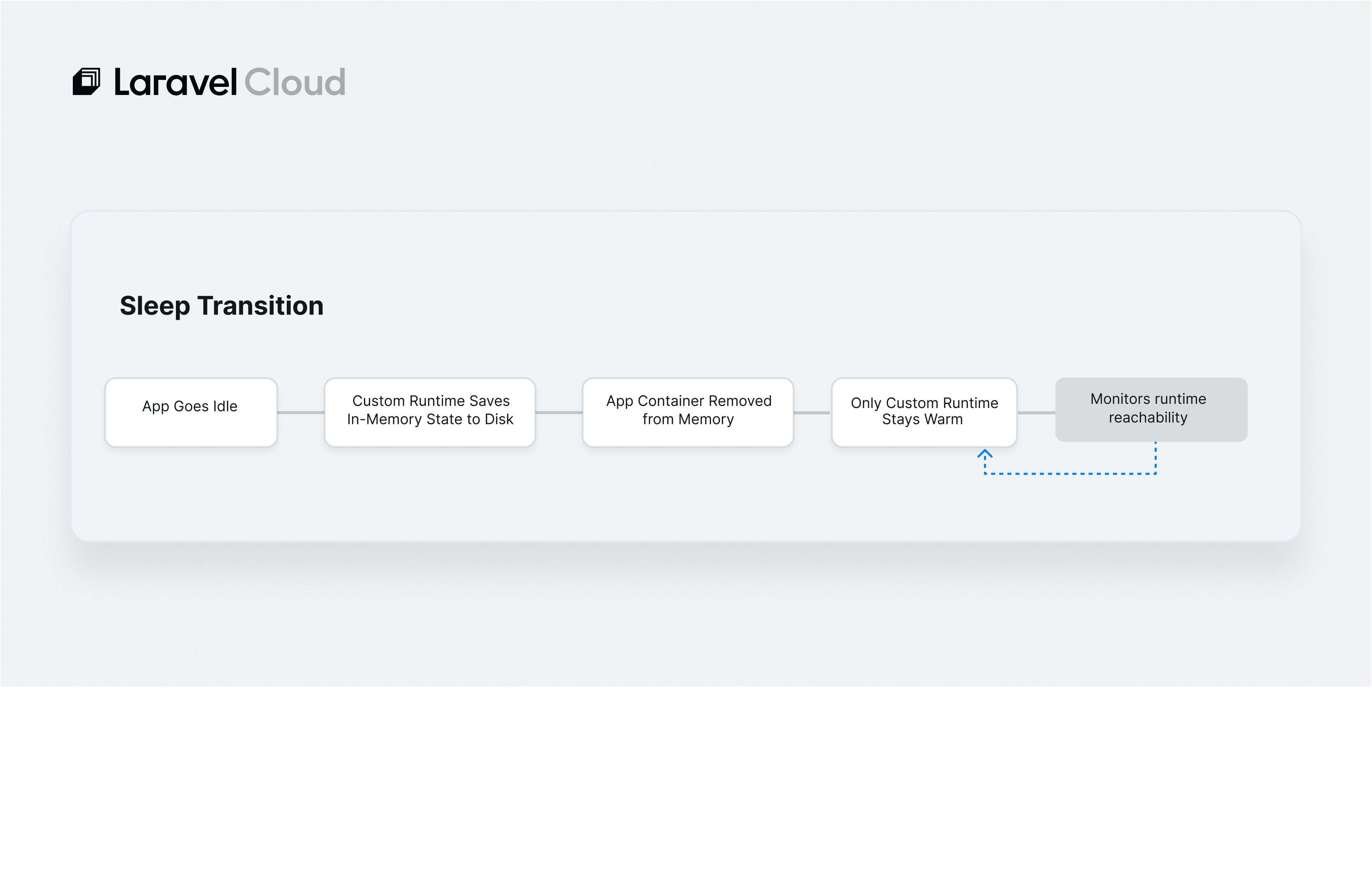
To fix the slow wake times, we designed a new implementation that keeps the app image and in-memory state on the disk of a compute node. When an HTTP request or command execution triggers a wake, the container runtime restores the app processes from that in-memory snapshot.
"On request, the container runtime restores the app processes from the in-memory state and is able to respond to the incoming request within hundreds of milliseconds," explained Cyrill Troxler, Senior Software Engineer of Infrastructure at Laravel.
The technology is container checkpoint/restore, an outgrowth of CRIU (Checkpoint/Restore In Userspace). When your app sleeps, the runtime writes a complete snapshot of its process state to disk on the compute node, including memory pages and open file descriptors. Restoring from that snapshot skips the scheduling, image pull, and process initialization that a cold-boot path requires.
When sleeping, the only thing running is the custom runtime that can restore the full app container on demand.
The Hardest Engineering Problem
Getting checkpoint/restore to work on a single app is not difficult. Getting it to work reliably across a large fleet of apps with varying runtimes, configurations, and dependencies is a different problem entirely.
"Getting the checkpoint/restore to work reliably on a huge fleet of apps with various app runtimes and different configurations [was the hardest part]. Plus, the integration work we had to do on the OS-level with a very restrictive stack," said Cyrill.
The infrastructure runs on Bottlerocket, Amazon's container-focused Linux distribution, with SELinux enforcing strict security policies. Installing a new container runtime on that stack required package-level integration work that Bottlerocket's upstream build does not support out of the box.
"We initially thought we'd need to build and maintain our own Bottlerocket variant to be able to install the new runtime. We got it to build and run, but just keeping up with releases and distributing the images globally would have been a lot of work. We eventually figured out a way to install it on the official upstream version, which saved us a ton of time and effort," said Cyrill.
The other constraint was storage. Sleeping apps write their in-memory state to disk on the compute node. That storage needs to be fast enough to restore within hundreds of milliseconds, but cost-effective enough to run across a global fleet. Finding the right balance between input/output operations per second and storage size took iteration.
How Compute, Database, and Cache Wake as a Unit
The three components of your Laravel Cloud stack do not wake through a central orchestrator— they signal each other.
Compute wakes on an incoming HTTP connection or command execution. Once the app container is restored and running, it opens connections to MySQL and Laravel Valkey using normal client drivers. Those Transmission Control Protocol connections are what wake the database and cache.
"The app wakes by HTTP connections or command execution and cache/databases on TCP connection (normal Valkey/MySQL client connection)," explained Cyrill.
This design keeps wake coordination lightweight. Your app does not need to know the database was sleeping. It opens a connection, and the database wakes. That removes an orchestration layer and eliminates an additional failure point.
For Valkey, the benefits go further. Because the new runtime restores the full in-memory state, the cache looks exactly the same as it did before sleeping. When your app wakes and connects, the cache is warm. The only overhead is the small initial TCP connection delay.
Preventing a Thundering Herd and Scheduled Tasks During Sleep
When multiple requests arrive while an app is sleeping, the first one triggers a wake. The rest are queued and forwarded concurrently once the app is ready, without dropping any requests.
For scheduled tasks, a central scheduler running outside the customer workload handles waking individual apps and executing schedule:run. That scheduler is always on: your app does not need to be running for the scheduler to know it has work to do.
Queue workers use the same mechanism, with the user specifying the wake schedule. For applications that need immediate queue processing without a scheduled interval, managed queues are the right choice. Those workers run on infrastructure that stays warm and process jobs as they arrive.
Failure Modes
If the checkpoint/restore wake fails, the system falls back to a cold start. The app boots from scratch, which takes longer, but no request returns an error.
"There's a fallback mechanism when a wake fails, which will simply start the app container from scratch. This incurs a slight delay but still ensures there's no request error on the user's side," said Cyrill. "We monitor for such failures and continuously improve the system to try to keep them at a minimum."
Monitoring a sleeping app presents an obvious challenge: there is nothing running to check. The system monitors the custom runtime itself. It continuously verifies whether the runtime is reachable. If that check fails to meet a threshold, the runtime restarts automatically.
Ship on Laravel Cloud Today
This architecture is live on every new Flex application on Laravel Cloud. New apps get scale-to-zero Flex compute automatically.
If you are already on Cloud and want the improved wake times, select one of the new Flex compute sizes (512 MB, 1 GB, or 2 GB) and redeploy. If you’re new to Laravel Cloud, the first month of the Starter plan is free.