There are three things every user should get from their background job processing infrastructure. First, jobs should run reliably without constant attention. Second, when something fails, you should be able to see it immediately and resolve it without engineering escalation. And third, when your queues are empty, you should not be paying for idle compute.
Laravel Cloud's managed queues feature addresses all three. Every Laravel Cloud app can run queue workers in isolation from your app cluster, which scale based on several factors, including the number of jobs waiting and message age. Workers then drop to zero when there is nothing left to process, reducing costs.
When jobs come in, workers wake in under one second, keeping even the most latency-sensitive applications fast. There is no compromise between cost and speed.
What We Set Out to Solve
Customers running background jobs on Laravel Cloud kept running into the same set of problems, and this feedback shaped every decision we made while building managed queues.
Our previous attempt at solving long-running jobs, queue clusters, faced the following problems:
- Running queues at scale was unpredictable. Customers needed a more reliable foundation that could handle jobs that were not uniform in size.
- Queue depth couldn’t be measured independently. Cloud had to go through the application to read depth metrics. Low-traffic apps kept workers running even when queues were empty.
- Scaling added unused capacity. Multiple workers were packed into a single pod, scaling up within that pod until it hit capacity, then provisioning a new pod and repeating the cycle. Users were paying for capacity they had not yet used.
- Failed jobs were invisible. Customers could not visualize failed jobs, leaving them to dig through logs to find out what happened.
Managed Queues: A New Way to Run Background Jobs
Managed queues is a ground-up rebuild that solves each of these problems.
When queues are empty, workers scale to zero. When jobs arrive, workers scale back up based on how many are waiting and how long they have been there. You pay for the compute and queue operations that ran, not the capacity you reserved.
- Isolated workers: Workers run separately from the app cluster, so background jobs never compete with web traffic.
- Autoscaling based on queue pressure: Cloud scales workers up as jobs accumulate and back to zero when the queue clears.
- Pause and purge: Pause halts processing without losing jobs. Purge clears the queue entirely.
- Queue dashboard: A real-time view of job volume, duration, average memory utilized, and replica counts. Failed jobs surface with full detail, and you can drill in to see why a job failed and retry it with one click.
For the first time on Laravel Cloud, teams can see exactly what failed, understand why, and recover without querying a database. A support team member fielding a complaint about a missing email or a failed export can investigate and retry directly from the dashboard.
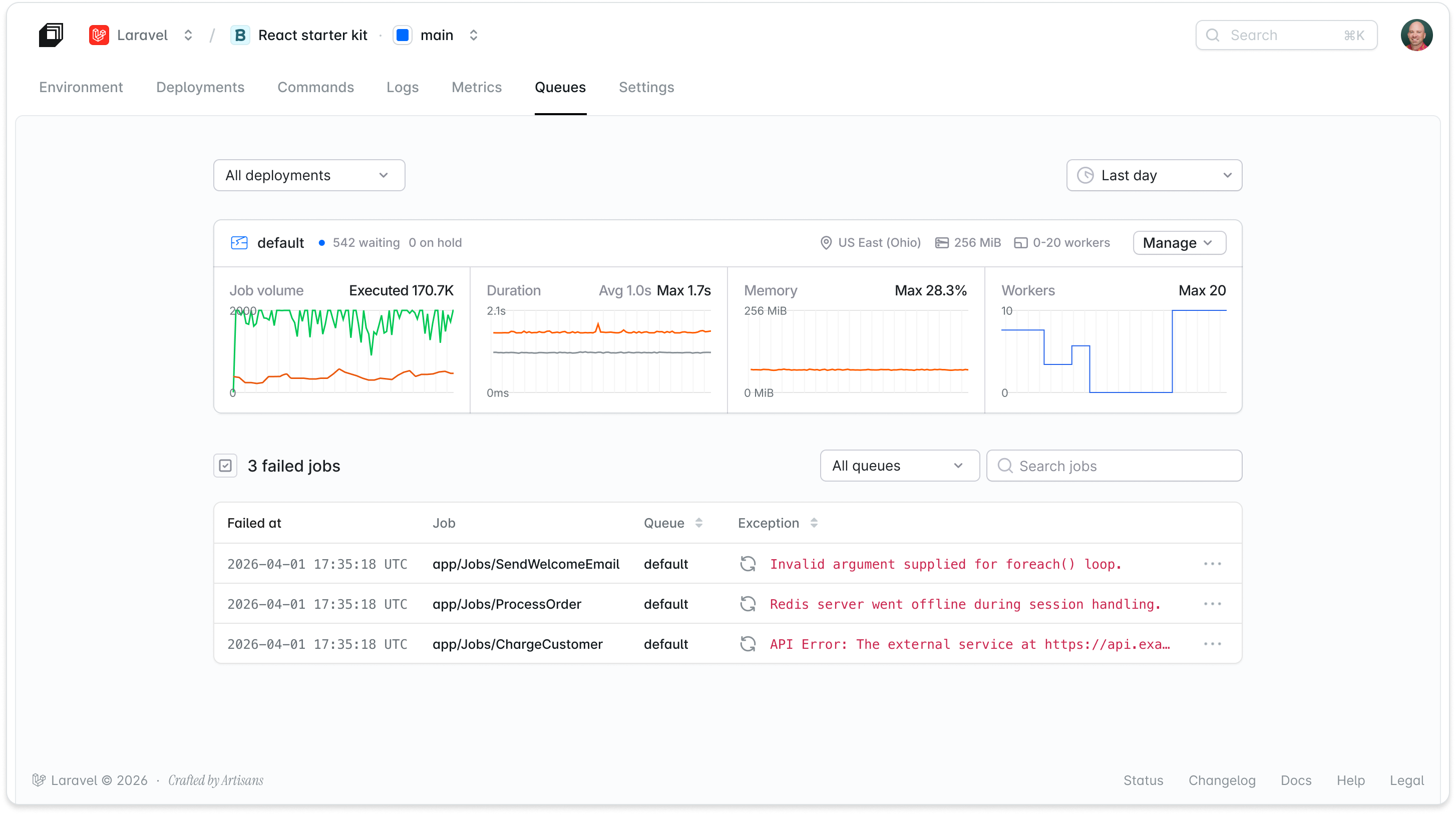
Managed queues improvements since launch
Solving cold starts
Spinning up a new Kubernetes pod used to take about 30 seconds, which made scaling to zero painful for latency-sensitive applications. Teams kept a warm worker running just to avoid the wait, which defeated the very point of scale to zero in the first place.
Idle workers now sleep instead of shutting down, and wake in under a second—30 times faster than before—when a job arrives, measured from job dispatch to the worker running the job. Scale to zero is now the default choice, not a trade-off you make to save money.
Another change is that every worker used to check SQS on its own to see if new jobs were waiting, at intervals that customers had to tune. That has now been replaced by a shared poller fleet that monitors SQS on the app's behalf and pushes jobs to workers as soon as they arrive. There is no interval to configure, and pickup is faster in practice than the old per-worker polling.
Set a minimum worker count
If you never want to see a cold start on a specific queue, you can now set a minimum number of workers that stay alive at all times. Give a queue a minimum of one, and it always has a worker warm and ready. Give a critical queue a minimum of 500, and burst traffic gets processed the instant it arrives.
The minimum sets the floor; the autoscaling algorithm still adjusts up to the maximum based on real-time queue pressure.
FIFO queues and how they enable ordered delivery
With the introduction of FIFO queues, there are two queue types available.
In a Standard queue, jobs are processed roughly in the order they arrive, but the queue can occasionally deliver them out of order or more than once. That is fine for most background work, but not for cases where order matters.
If a customer updates their shipping address and then places an order, you do not want those two jobs processed in the wrong sequence. If a ledger records a deposit and a withdrawal, replaying them out of order changes the balance.
FIFO queues guarantee that jobs are delivered exactly once and in the exact order they were sent (first in, first out). Use them for workloads like payment processing, ledger updates, or any sequence of events where getting the order wrong would corrupt state.
FIFO queue names get a .fifo suffix, the queue type is fixed once you create it, and high-throughput mode is on by default.
Scheduled scaling overrides
If you know queue load will spike at a specific time, such as nightly feed processing, a scheduled batch import, or a promotional window, you can now create cron-based scaling rules to preemptively bring workers up before the demand hits.
Set a schedule, define the min/max range for that window, and pick the time zone. When the window closes, scaling returns to normal.
Independent, zero-config queue creation
Each queue has its own compute, workers, and scaling settings as before, but creating one requires only a name, type, size, and autoscaling range. An Advanced tab exposes overrides for teams that need them.
Bulk failed-job actions
You can now retry or delete failed jobs across an entire queue instead of handling them one at a time.
If you’re already using managed queues, you can access these improvements by running composer update and deploying.
How we built managed queues
Building managed queues meant rethinking the earlier assumptions we had made with the previous queue clusters solutions. Here’s what changed and why.
Owning the Queue
The most consequential decision was making Laravel Cloud the queue driver. With queue clusters, supporting any queue driver meant relying on the user's application to read depth metrics. "We needed to use their Laravel application to get metrics like depth," says Kieran Brown, Senior Software Engineer on the infrastructure team at Laravel.
Owning the queues removes that dependency entirely. Cloud reads depth straight from SQS, independent of whether the customer's application is healthy.
One Worker, One Pod
Queue clusters packed multiple workers into a single pod. When one worker ran out of memory, it caused the pod and everything running alongside it to crash.
Managed queues run every worker in its own isolated Kubernetes pod. A worker configured for 512 MB gets exactly that, guaranteed, with nothing else sharing the allocation. "Nothing's running together anymore," Kieran explains. "Every single managed queue worker runs in its own isolated pod, which means we can guarantee those resource allocations." One worker failing cannot affect another.
Horizontal scaling also changed the cost model. Before, scaling out meant provisioning an entirely new cluster to run one additional worker. With managed queues, each new worker is its own pod. This means that scaling adds 256 MB increments, not 4 GB ones.
Getting the Scaling Formula Right
The hardest part of building managed queues, and one we will keep refining, is the scaling algorithm itself. Queue depth alone is not enough of a signal. Five jobs in a queue sound manageable until each one takes two minutes to process. "If you only look at queue depth, you might get one worker spun up, but your queue would take forever," Kieran notes. "If each job takes 60 seconds to two minutes, even with just five messages, you're looking at ten minutes or more to clear."
This challenge has been fixed by replacing queue-depth heuristics with a new scaling algorithm that weighs queue pressure and average job runtime, among other criteria, and can scale from 1 worker to 10 the moment it detects the work will not clear fast enough. There is nothing for customers to tune, and pickup is faster in practice than the old queue-depth approach.
Flex and Pro compute
Laravel Cloud now has two queue classes to match how workers behave to your workload.
Flex is the default. It scales to zero, wakes in under a second, and runs on spot-backed hardware in sizes from 256 MB to 2 GB. It is built for spiky or idle-heavy work, and it costs the same as managed queue compute does today.
Pro stays on all the time with no cold starts, runs on on-demand hardware, and supports sizes up to 8 GB (16 GB on dedicated environments). It handles job runtimes of about an hour, with the visibility timeout extended automatically as a job runs long. That automatic extension is available on Flex too, so a job that occasionally runs long does not fail just because it scaled up from zero.
Flex is available on every plan. Pro is available on Growth and above.
Who are managed queues for?
Managed queues are designed to scale from the smallest hobby app to enterprise workloads.
Hobby and side projects: On Flex, workers scale to zero alongside the rest of your app. Park a project for a few days, and you are not paying for idle worker compute while it sits untouched.
Applications with variable or burst load: If your application needs high worker concurrency for a fraction of the month, you pay for those hours, not for continuous capacity provisioned to handle peak load. Managed queues adjust automatically and bill accordingly.
Teams with multiple job types: Each Laravel queue name gets its own managed queue with independent configuration. A small compute allocation handles transactional email. A larger one handles video processing or report generation. Each queue also picks its own compute class, so transactional email can run on Flex and drop to zero when idle, while a report generator stays warm on Pro.
Enterprise applications at scale: Customers at scale are already running managed queues with more than 1,000 max replicas, and Growth plans can now scale to 100 workers per queue, up from 25. At that scale, managed queues isn't just about cost; it's about offloading the operational work of running queue infrastructure entirely. Right-sizing workers, debugging failures across millions of jobs, and keeping throughput healthy is real engineering time that Cloud now handles for you.
Managed Queues Pricing
Managed queues is billed per second plus per million queue operations.
| Tier | Starter | Growth | Business |
|---|---|---|---|
| Max workers per queue | 3 | 100 | Unlimited |
| Queues per environment | 1 | 10 | Unlimited |
Get Started
Managed queues are now available on Laravel Cloud. Open your Laravel Cloud dashboard and select your application to create your first managed queue. If you’re not a Cloud user yet, you can start with $5 in free usage credits.
If you were already using managed queues and want to access the new improvements, run composer update and deploy.
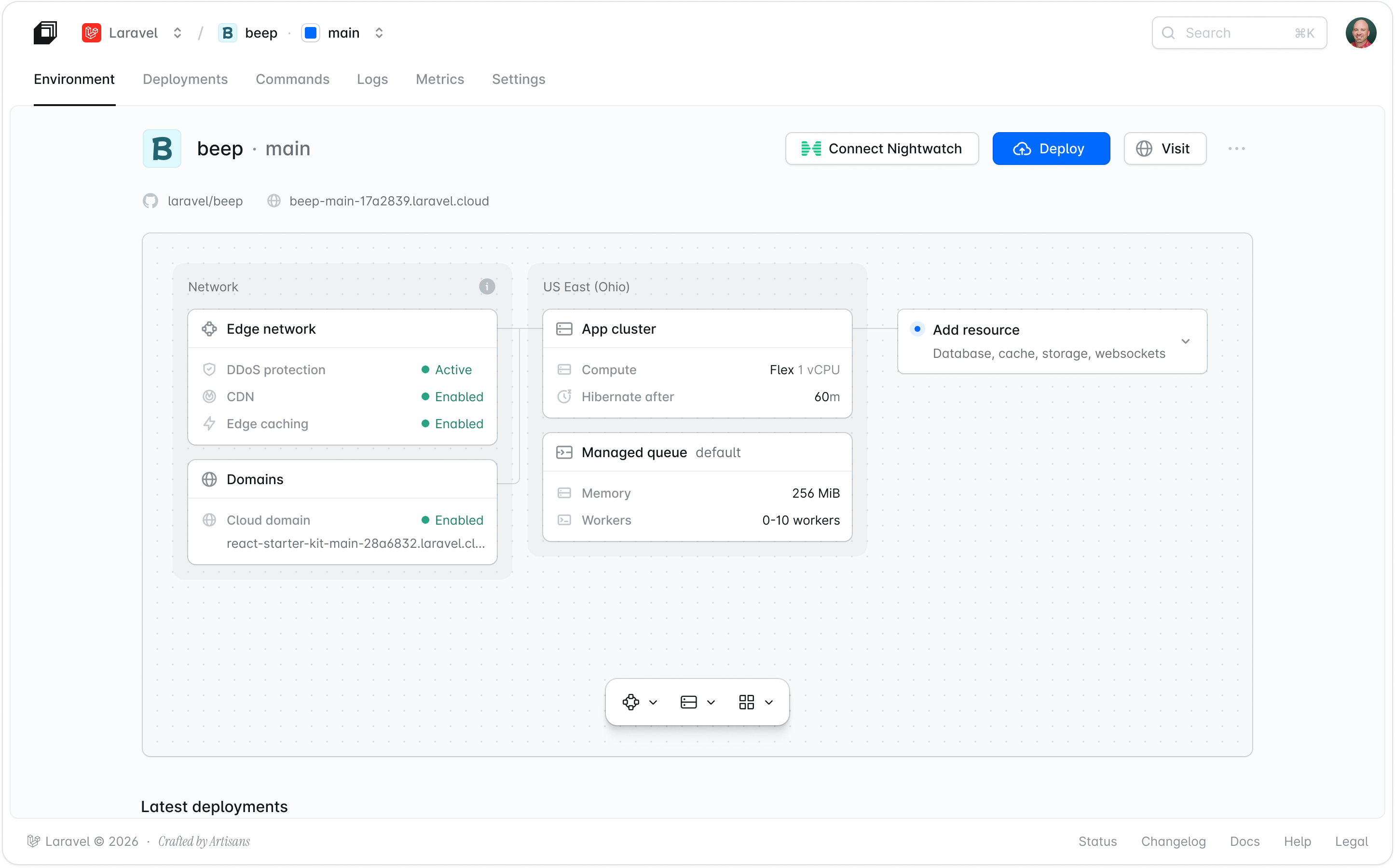
Full configuration details are in the managed queues documentation.