Managing a Symfony application in production comes down to two main options: own the servers, which means operating system patches, nginx configuration, and scaling decisions when traffic spikes, or pay for a Symfony-specific platform that charges per-project and per-user fees that compound before your first deploy.
Now, you have a third option. You can deploy your Symfony application on Laravel Cloud and run it on the same managed infrastructure running thousands of production workloads, on the same plans, at the same price as Laravel applications.
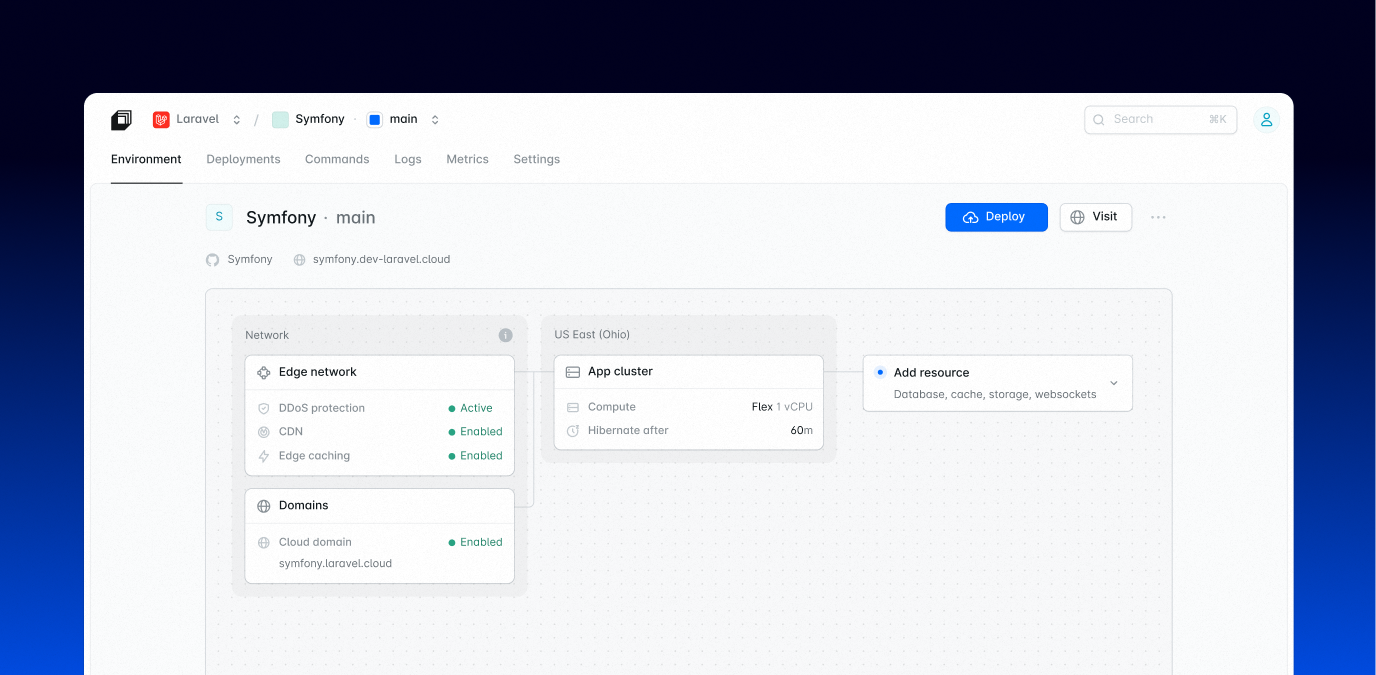
Symfony was built to be composable. Laravel Cloud was built to ship. Now your apps get both.
What This Means for Your Symfony App
You don't need to rewrite anything or adopt Laravel conventions to deploy your Symfony app. Laravel Cloud reads your composer.json, detects symfony/framework-bundle, and switches automatically to support all the features you use from Symfony, such as queues, commands, and background processes. Your application’s structure doesn’t need to change.
What changes is everything around the application. Server provisioning, nginx configuration, SSL certificates, operating system patches, scaling decisions: the platform handles all of it, freeing your time to focus on the application and take on new projects. Every push to your configured branch automatically triggers a zero-downtime deployment.
For teams managing multiple projects or client work, preview environments give every pull request its own fully deployed, isolated environment with a unique URL. Your team reviews live features without a staging merge, clients get a link instead of a screen share, and the environment disappears automatically when the PR closes.
Predictable Infrastructure, Predictable Costs
Flex compute scales to zero when your app is idle and wakes in under 500 milliseconds when traffic arrives, so staging environments and low-traffic apps don't run up a bill just by existing. Pair that with a hard spending limit per organization with alerts firing at 50%, 80%, 90%, and 100%, and you can budget with precision rather than reconcile surprises at the end of the month.
Built-in metrics, logs, and HTTP analytics come standard. Laravel Valkey gives you managed Redis-compatible connection credentials injected automatically. Queue workers and scheduled tasks run as managed processes on your app cluster (the primary compute and infrastructure that will run your app) or dedicated worker cluster.
Managed queues are also available for Symfony apps via thelaravel/symfony-on-cloud package, bringing the same scale-to-zero model to background jobs. Workers run isolated from your app cluster, scale up as jobs accumulate, and drop back to zero when the queue clears, so you pay for the compute that ran, not the capacity you reserved. Failed jobs surface in the dashboard with full detail, and you can retry them with one click without touching a log file.
Supervisor configuration, worker restarts after deploys, and process management are all handled for you. Scheduled tasks run on always-on Pro compute, since Cloud needs the app awake to fire them on time, or on Flex compute with scale to zero disabled.
How to Deploy Your Symfony App on Laravel Cloud
Connect your GitHub, GitLab, or Bitbucket repository to Laravel Cloud, and let it take care of the rest. It supports the default Symfony configuration, but you may tweak the build and deploy commands to meet your requirements:
Attach a database resource from the environment overview, and DATABASE_URL is injected into your environment automatically, so you don’t have to configure credentials by hand.
If you're running multiple Symfony apps, or a mix of Symfony and Laravel applications, they all live in the same Laravel Cloud organization with unified billing, access controls, and monitoring.
Why Symfony Developers Should Care About This
Finding the best Symfony hosting option for your needs can be challenging. Managed Symfony platforms charge per-project and per-user fees that compound fast as your team and project count grow. Generic cloud platforms work, but they're not built for PHP, and you'll feel it. Self-managed servers give you control, but someone still has to patch them, scale them, and respond when they stop working at 2 a.m.
Laravel Cloud provides fully managed infrastructure that actually understands PHP. The same platform that runs high-traffic Laravel apps can now run your Symfony application with the same defaults, the same support, and the same zero-ops promise. You should not have to choose between frameworks to get great infrastructure.
The Starter plan is $5 per month with $5 in monthly usage credits, unlimited applications, and unlimited users—and your first month is free. It's enough to deploy a real Symfony application and see exactly what the platform can do before you commit to anything.
Start deploying your Symfony apps on Laravel Cloud today. If you're building with Symfony and have questions or feedback about running it on Cloud, we'd love to hear from you.
P.S. Jérémy Nikolic, Engineering Manager of Cloud Apps at Laravel, will be speaking at the API Platform Conference on September 17 in Lille, France. His talk covers deploying Symfony on Laravel Cloud. If you're attending, it's a good opportunity to share what you're building and ask questions directly to the team.