The Laracon US keynote covered a lot of ground this year.
Here's everything you can do right now:
- Stop paying for idle compute as your whole stack (MySQL included) sleeps and wakes in under 500 milliseconds with Laravel Cloud's scale-to-zero Flex compute.
- Run managed queues on Laravel Cloud that scale to zero when your queue is empty.
- Deploy your Next.js or Nuxt frontend alongside your Laravel backend, from the same monorepo, on Laravel Cloud.
- Point your editor at the new Laravel Language Server Protocol and get the same autocomplete and navigation Laravel developers already get in VS Code, now in NeoVim, Zed, or Sublime Text.
- Debug your Inertia apps with Inertia DevTools, a Chrome extension that shows every request, header, and hydrated prop flowing between your Laravel backend and Inertia frontend.
- Keep a human in the loop (HITL) for your AI agents with the Laravel AI SDK’s new HITL API, so you can approve, deny, or modify tool calls before an agent acts on them.
Other highlights include Framework updates such as image manipulation and Blade support in Laravel Pint. On the Cloud side, we walked through MySQL scale-to-zero, managed queues, Private Cloud updates, and more.
Keep reading to learn more about everything we shipped.
Laravel framework
Laravel image manipulation
Laravel's new image manipulation API gives you a fluent, chainable way to resize images, convert formats, set device pixel ratio, and output the result directly to the browser, all from PHP, without reaching for a separate image library.
Laravel LSP
The Laravel VS Code extension has quietly become one of the most useful tools in a Laravel developer's editor: autocomplete for routes, views, and config, inline documentation, and more. Until now, all of that lived inside one extension for a single editor.
Laravel LSP generalizes that same functionality into a Language Server Protocol implementation, so any editor that speaks LSP, including NeoVim, Zed, and Sublime Text, gets the same autocomplete and navigation features that VS Code users already have. Point your editor at the Laravel LSP, and it works the same way, regardless of which editor you use.
Inertia DevTools
If you've used Vue DevTools, Inertia DevTools will feel familiar. Inertia DevTools is a Chrome extension built specifically for Inertia applications that shows you every network request your app makes, how Inertia's headers are being set, and what props are hydrated on each page.
Instead of digging through the network tab to figure out why a prop isn't showing up the way you expect, Inertia DevTools gives you a dedicated view into how data flows between your Laravel backend and your Inertia frontend, end-to-end.
CPX
Node developers have had npx for years: a way to run a package without installing it in your project. PHP developers haven't had an equivalent, so we took a dormant open-source tool called CPX and rebuilt it.
With CPX, running cpx laravel/pint executes Pint against your project without adding it to your composer.json. You can alias commands so cpx pint works instead of the full package name, run local scripts that pull in dependencies your project doesn't have, and even execute a script directly from a GitHub Gist URL.
Package skeleton
Building a Laravel package used to mean assembling your own skeleton: config files, migrations, routes, translations, tests, and CI workflows, all wired up by hand. The Laravel package skeleton is a GitHub template that already has everything in place.
Clone it and run the interactive setup script, answering a few questions and selecting the features your package plans to utilize. The script removes anything you didn't ask for and can even create the GitHub repository for you, so you can start writing package code within minutes instead of hours. A lightweight laravel package CLI command builds on the same skeleton for a concise way to spin up a fresh package.
Artisan dev
Most Laravel projects run their local dev processes through composer dev, which wraps npx concurrently to run your server, queue worker, and asset builder side-by-side. It works, but adding or removing a process meant editing your composer.json scripts by hand.
You can also register additional commands from a service provider like Reverb or Stripe's CLI webhook listener (see code above)
The artisan dev command moves that configuration to the PHP side. You register your dev commands in your app service provider, assign each one a color (optional), and packages like Laravel Reverb or Laravel Horizon can register their own commands automatically the moment they're installed.
You control which processes run by chaining only() and except() methods when you register them, and you can inspect what's registered with the --only and --except flags on artisan dev. Under the hood, it uses proc_open to replace the PHP process directly, so there's no extra runtime overhead compared to the old npx concurrently approach.
Head tag API
Managing everything between your HTML <head> tags, Open Graph images, canonical links, progressive web apps metadata, descriptions, has traditionally meant scattering <meta> tags across your Blade views by hand. The new head tag API gives you a fluent, PHP-side way to configure everything in one place.
Set defaults globally for your entire application, then override them at the route or view level wherever you need more specific behavior.
Blade support in Pint
Laravel Pint already formats your PHP files with an opinionated, zero-config setup built on PHP-CS-Fixer. Pint now extends that same formatting to your Blade templates, so your views get the same consistent, automatic formatting as the rest of your codebase.
Artisan doctor
Artisan doctor runs a set of health checks against your Laravel application: is your APP_KEY set, does your PHP version match what Composer expects, are your required extensions installed, and is your environment configuration complete? Where it can fix an issue automatically, it does. Where it can't, it tells you exactly what's wrong.
Packages can register their own diagnostic checks, so a package with specific configuration requirements can plug directly into artisan doctor and surface its own health checks alongside the framework's. It's also a natural last step for AI coding agents: after making changes, an agent can run artisan doctor as a final sanity check before considering a task done.
Refreshable locks
Holding a lock for a long-running task has always meant a trade-off: too short a duration risks duplicate work, too long a duration leaves a stale lock behind if the job fails partway through. Refreshable locks now give you a third option: take a short lock, do one unit of work, and call $lock->refresh() to extend it before it expires.
You can pass a custom number of seconds to refresh(), or leave it blank to reuse the lock's original duration. If the job fails, the lock expires in seconds instead of sitting locked for the full original duration.
Debounced jobs
Say you're keeping a product search index up to date. Every change to a product is a reason to reindex it, but if a product gets edited five times in quick succession, you don't need five reindex jobs, you only need one. Debounced jobs collapse repeated dispatches into a single job so you can dispatch jobs as many times as you want in a short window, and only one actually runs.
Complex bindings
Service container bindings have traditionally lived separate from the class they bind. This means that in a service provider, you generally have to go find it. Now, a new binding syntax lets you declare a binding right next to the implementation itself, so you can see what's going into the container without leaving the file.
Laravel AI

Laravel AI SDK: Human-in-the-Loop Tool approval
Until now, an AI agent built with the Laravel AI SDK ran on autopilot: once it started executing tools, there was no way to step in. The new human-in-the-loop (HITL) API lets you intercept specific agent actions and require a decision before the agent proceeds, so you can approve, deny, or modify what happens next instead of finding out after the fact.
Filesystem tools for AI agents
Agents built with the Laravel AI SDK can now use built-in filesystem tools to read, write, and manage files as part of their tool set, without you having to build that integration yourself.
Summarize any string
The Laravel AI SDK adds a summarize() method on the Str helper, no configuration required. It uses the cheapest model available on your configured provider by default, and you can specify how many sentences you want back. Pair it with an Eloquent observer, and a model's summary field can update automatically whenever the underlying content changes.
Multimodal embeddings
The Laravel AI SDK can now generate embeddings for images and audio, not just text, so you can build semantic search across media instead of relying on filenames or tags. Embedding results are cached automatically through whatever cache driver your app already has configured.
Boost: Infer conventions and journaling
Laravel Boost now infers your project's actual coding conventions using a skill, and logs its decisions as it works. That means the AI agents working in your codebase through Boost follow the patterns your team already uses rather than patterns from an average Laravel app.
AI SDK: OpenAI-compatible provider
The Laravel AI SDK now supports any OpenAI-compatible provider, not just OpenAI itself, so you can point your agents at any service that implements the same API shape.
Laravel Cloud
Cloud, one year later
Since launching in February 2025, Laravel Cloud has shipped a long list of features driven directly by user feedback:
- Managed WebSocket clusters powered by Laravel Reverb at up to 50% lower cost than third-party alternatives
- A Redis-compatible Laravel Valkey cache with 20-50% lower latency
- A REST API and CLI so your pipelines and AI agents can deploy without touching the dashboard
- Spending limits that stop new resource provisioning once you hit a limit you set yourself, with alerts at 50%, 80%, and 90%, and 100% of your threshold along the way
But that’s not all we shipped.
Managed queues
With Laravel Cloud’s managed queues, workers now run on isolated compute, completely separate from your application cluster, and scale based on queue depth. When the queue empties, workers scale back to zero, and you stop paying for the capacity you’re not using.
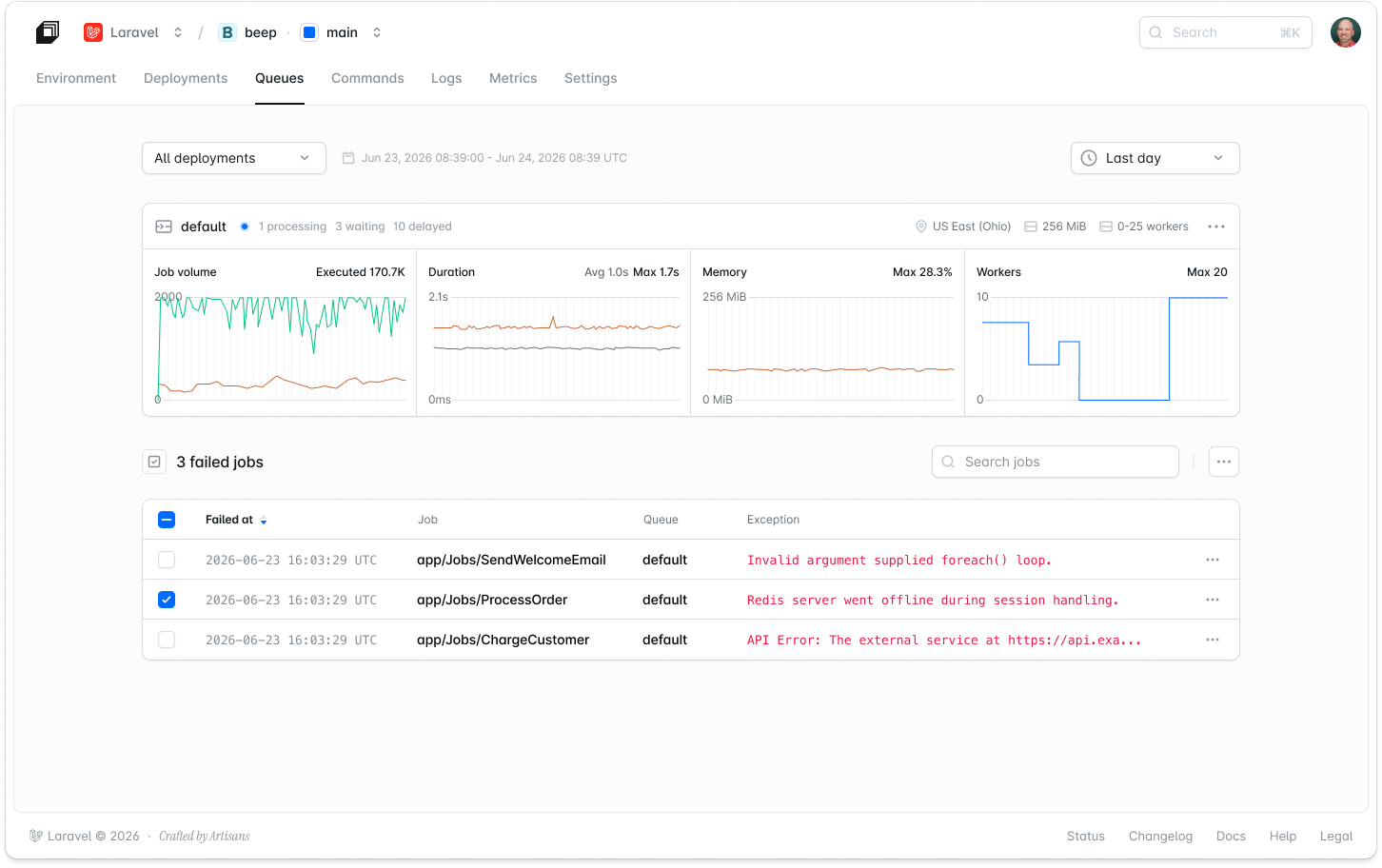
The dashboard shows every failed job, along with the reason it failed, and offers one-click retry, so heavy background work no longer competes with your web traffic for resources.
The feature has been improved since launch, with idle workers now waking up in under one second (down from about 30 seconds), first-in, first-out (FIFO) queues let you enforce strict message ordering for workloads like payments or ledger updates, long-running jobs of up to an hour are supported on the new Pro class, and you can now preemptively scale capacity on a schedule for known high-demand windows.
If you were already using managed queues, run composer update and redeploy your application to try the new version.
Scale-to-zero Flex compute
Most of your apps aren't handling production traffic around the clock. Side projects, staging environments, internal tools, and client demos sit idle far more than they are in use, but on most platforms, you pay for compute whether anyone’s using the app or not.
Cloud’s previous scale-to-zero implementation took about 10 seconds to wake a dormant app, which meant users would notice the lag. The new scale-to-zero Flex compute was a ground-up rebuild: compute, database, and cache sleep and wake together, all in under 500 milliseconds, 20 times faster than before, without your users ever noticing it.
New Flex apps automatically get the benefits of scale to zero.
MySQL scale-to-zero
Scale to zero shipped first for Postgres-backed applications on Flex compute, but the same architecture now extends to MySQL databases. When a MySQL database using Flex compute sees no activity for its configured idle window (anywhere from one minute to one hour, or never, if you'd rather it stay awake), compute suspends while storage stays mounted the whole time.
Secrets manager
Teams running several apps and environments have typically copied the same API keys and tokens into each one by hand, which makes rotation slow and makes it hard to know where a value actually lives.
Cloud's secrets manager centralizes that: define a secret once at the organization level, link it to as many environments as you need, and Cloud injects it as an environment variable at deploy time. Values are encrypted client-side before they reach Cloud's servers and aren't shown again once saved, so rotating a credential means writing a new value one time and redeploying the environments that use it.
Next.js and Nuxt deployments
Most Laravel APIs don't stand alone. They're usually paired with a Next.js or Nuxt frontend that has, until now, needed its own separate hosting platform, deployment pipeline, and bill.
Laravel Cloud now deploys your Next.js or Nuxt frontend from the same repository as your Laravel backend. When you connect a repository, Cloud detects whether it contains one application or several. If it finds both a backend and a frontend, you can create a separate Cloud application for each, rooted at its own directory.
Each application maintains its own environment variables, scaling settings, and domains, but they share a single bill and a single set of team permissions. Every multi-language application, including Next.js and Nuxt, now runs behind Nginx, which also brought configurable ports and runtime access logs that weren't available for non-PHP applications before.
More languages and frameworks are coming soon. If you watched the Laracon keynote, you already know there's more on the way.
Private Cloud

Laravel Private Cloud gives you fully isolated infrastructure: your own AWS account, your own VPC, a dedicated Kubernetes cluster, and static outbound IPs you can share with third-party APIs for allowlisting. There's no shared surface area with any other customer, enabling you to comply with strict security and compliance regulations.
Private Cloud meets the bar your security team is already asking about. It is SOC 2 Type II attested, HIPAA-certified, and integrates with the SSO provider your company already uses.
Private Cloud is now HIPAA compliant
HIPAA certification joins the ranks of Private Cloud security and compliance badges alongside SOC 2 Type II, GDPR, and PCI-DSS. Teams building healthcare software or requiring compliance for university or government teams will now have the ability to use Cloud with dedicated infrastructure, private networking, and full tenant isolation. Visit the trust center to learn more.
Install additional software on Private Cloud with add-ons
Some applications need more than PHP and its extensions to run: media processing libraries, monitoring agents, or a headless browser for generating PDFs and screenshots. Private Cloud customers can now install that software directly into their application's build image as add-ons, instead of maintaining a custom Dockerfile or build script to get it there.
We must ship
That's everything from Laracon US 2026. Follow us on X or subscribe to our YouTube channel for more, including deep dives into some of these features.
If you haven’t tried Laravel Cloud yet, the first month on the Starter plan is free.