Trybe runs booking software for hotel spas across the UK, Europe, Australia, and the US. They process 500 million requests a month, store sensitive medical data, and cannot afford downtime. They just migrated their complex hybrid architecture from Laravel Vapor to Laravel Private Cloud without dropping a single request.
Devon Garbalosa and Trybe's Head of Engineering, Dan Johnson, hosted a technical webinar to walk us through how they did it. Here’s the recording, along with answers to the most technically interesting questions from the audience, including those that weren’t answered live due to time constraints.
Watch the full webinar on YouTube. Here's more info on how Cloud and Vapor differ.
The Numbers Behind the Trybe Migration
- 500 million requests per month
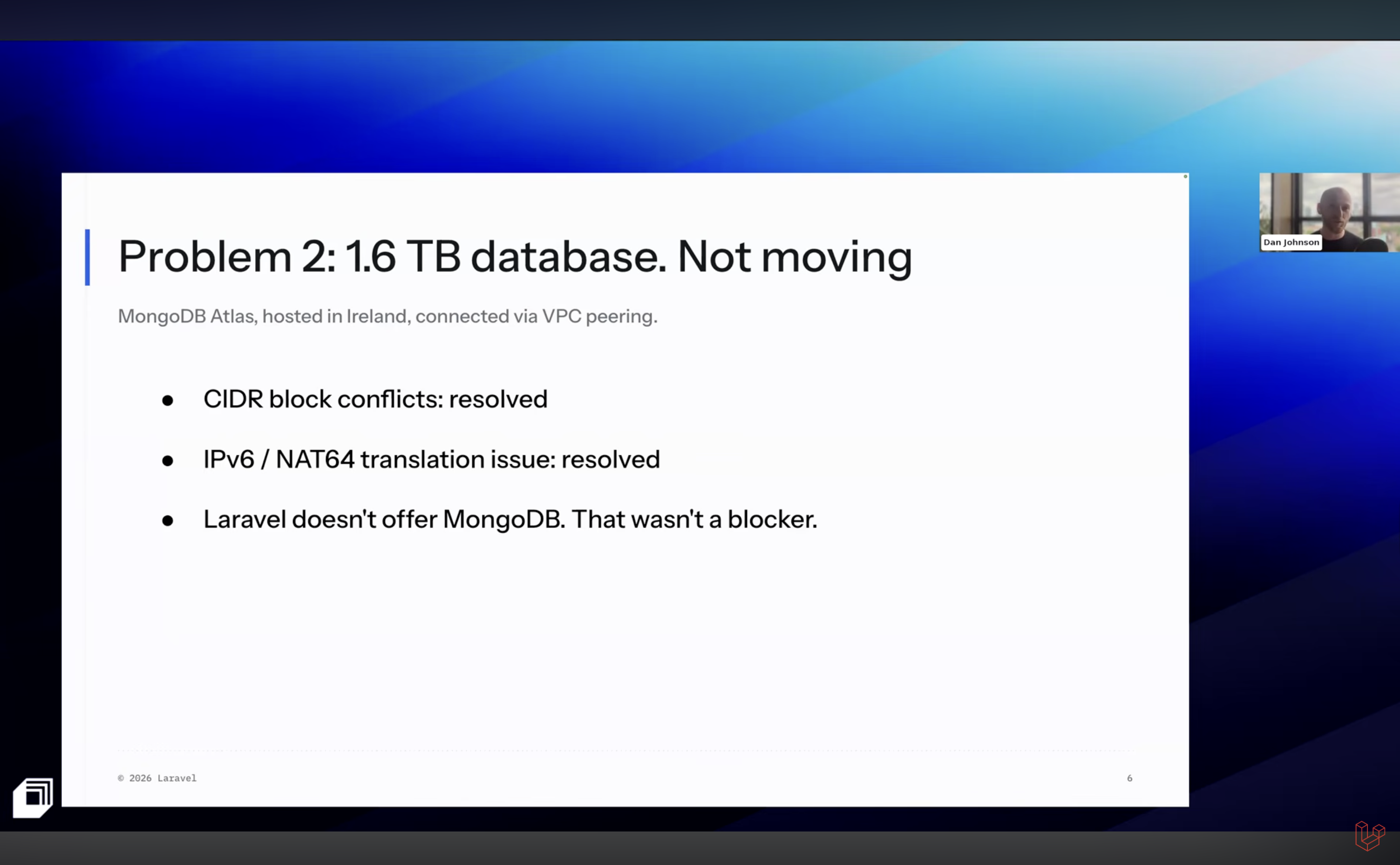
- 1.6 TB primary database (MongoDB Atlas, hosted in eu-west-1)
- 2.7 million queue jobs per day
- 1,440 scheduled task runs per day
- Four applications across three fully isolated Laravel Private Cloud environments
- 400 white-labeled shopfronts served via wildcard subdomain routing
An Intro to Trybe’s Hybrid Architecture
Trybe runs four separate applications behind one domain: a Shop API, Customer API, Inventory API, and Auth API. All four sit behind Cloudflare Workers, which parse the URL path and route each request to the correct application.
Each of the three fully isolated Private Cloud environments (staging, playground, and production) runs a copy of all four apps, with no shared networking or data between them.
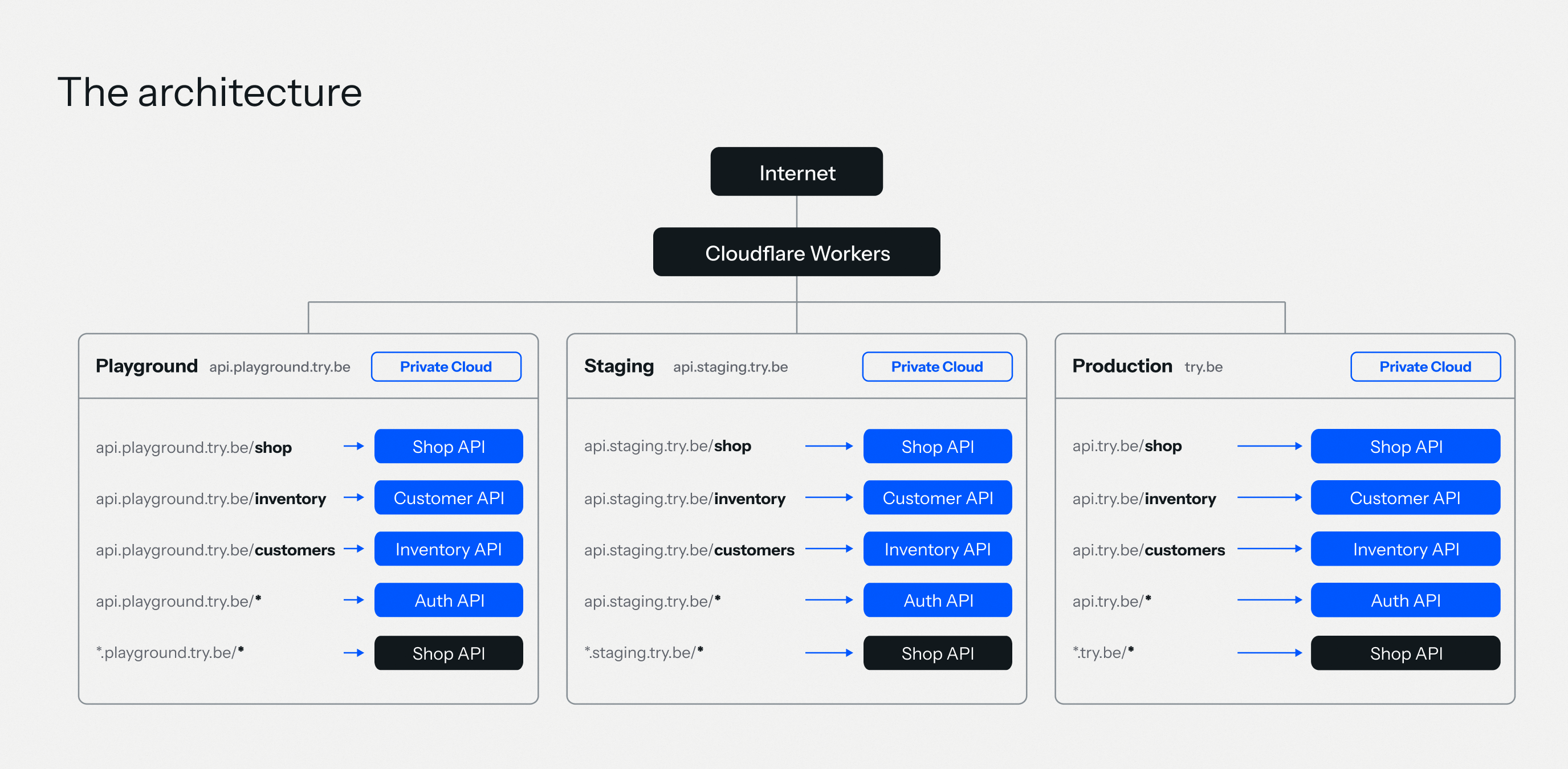 Trybe’s architecture
The isolation between environments is a hard requirement. Trybe stores intake forms containing patient health history. A staging environment touching production data would be a data liability.
The full migration story, including how the team resolved CIDR block conflicts, IPv6 routing issues, and the environment variable audit, will be covered in an upcoming customer story.
Q&A: Trybe’s Move from Vapor to Cloud
Did You Need to Change Any Code to Migrate to Laravel Cloud?
Asked by Jerome Bajou
For the most part, no. Dan said some endpoints were running "exactly the same code" on Laravel Cloud and performing significantly better. Queue jobs required zero code changes. They pointed the Cloud workers at the same SQS queue names, and that was it.
The one area worth auditing before any Vapor-to-Cloud migration is Vapor-specific abstractions. The vapor() helper and Vapor's temporary signed upload URLs are Vapor-only features. Laravel Cloud uses S3-compatible object storage powered by Cloudflare R2.
If your application already uses Storage::temporaryUrl() or Laravel's standard Storage facade, no code changes are needed. Just update the environment variables. If you rely on Vapor-specific upload helpers, those need to be replaced with the standard Laravel Storage API.
Environment variables are the bigger risk. Vapor auto-injected a large number of variables (database credentials, queue URLs, S3 details) without much visibility into which ones your config files depended on. On Laravel Cloud, every variable is set explicitly in the dashboard.
Missing one is the most common source of post-migration errors. Trybe caught theirs through Laravel Nightwatch, which surfaced unexpected exceptions in the first hours after each traffic ramp. Dan described the auditing and porting of environment variables as the biggest pain point in the entire migration.
How Big Is the Monolith Codebase? Does It Affect Bootstrap Time? Are You Running Octane?
Asked by Ariffin
Dan shared this after the session: the monolith is over 1,000 routes, with a 23 ms bootstrap time. They are not running Laravel Octane yet, but he said he would love to enable it someday once the application changes needed to support it are in place.
That is an important caveat because Octane keeps the application booted in memory between requests, which means any static state, singleton reuse, or in-memory caching that persists across requests can cause hard-to-debug issues. For a team still consolidating microservices into a monolith, it is worth waiting until the codebase is stable before introducing those constraints.
When they are ready to add Octane, Laravel Cloud supports it natively. It is a toggle in the App compute cluster settings, and Cloud runs it on FrankenPHP. The only requirement is that laravel/octane is installed via Composer before enabling it. At Trybe's scale, the bootstrap time savings would compound significantly across 500 million monthly requests.
Does Migrating from Serverless with Laravel Vapor to Containers with Laravel Cloud Cost You Performance?
Asked by SBT Joao
The opposite happened. Some of Trybe's report generation endpoints regularly hit Vapor's 30-second Lambda timeout. The same code, on the same data, ran in around 10 seconds on Laravel Cloud.
The reason is that Lambda cold starts, per-invocation overhead, and memory-to-invocation pricing all disappear with a warm, always-on container.
Laravel Cloud runs on AWS Graviton EC2 instances with three autoscaling strategies: a fixed single instance, a custom range with configurable minimum and maximum replicas, or unlimited horizontal scaling. All of them scale based on CPU and memory.
Why Use Weighted DNS to Split Traffic Instead of a Load Balancer?
Asked by Santhosh A
An application load balancer lives inside a VPC. It can route between targets within a single infrastructure provider. It cannot send a percentage of traffic to AWS Lambda (Vapor) and another percentage to a completely different cloud platform (Laravel Cloud) at the same time.
Weighted DNS routing in Route 53 operates before the request ever reaches either platform. You create two records for the same hostname, point each at a different endpoint, and assign weights. Route 53 resolves to one of them based on those weights. It is the only approach that works when you are migrating between two separate infrastructure providers and need live traffic split between them.
Trybe also tested rollback behavior early. After setting production traffic to 1%, they dropped it back to 0% and measured how long it took for requests to stop arriving at Cloud. The answer was about 30 minutes. That confirmed they could ramp up confidently, knowing a rollback would take effect within half an hour if anything went wrong.
How Does Laravel Nightwatch Compare to Sentry?
Asked by Dylan
Both tools cover the same ground at a surface level: exceptions, performance traces, and query monitoring. The real difference is the depth of Laravel integration. Laravel Nightwatch treats Laravel primitives as first-class entities. Sentry treats them as generic application events.
For Dan, scheduler health is one example. Nightwatch monitors whether your scheduled tasks run on time and are completed successfully with no extra setup. Sentry has Cron Monitors, but they require explicit instrumentation for each task.
Cache behavior is another: Nightwatch hooks directly into Laravel's cache events and captures hit rates, key patterns, and invalidation events automatically. Sentry does not surface cache behavior at all.
The same applies to mail and notifications. Nightwatch treats outbound mail as a queryable event type, including recipient, rendering performance, and send success. Sentry sees the job that sent the mail, not the mail itself, as a queryable thing.
For Trybe, the most immediate win was query monitoring. Because Nightwatch sees every query inside a traced request, it can identify N+1 patterns automatically. Trybe found a request doing 96 queries and reduced it to 12. They used Nightwatch data fed directly into Claude via the Nightwatch MCP server to work through the fix.
Trybe runs Nightwatch at a 10% sample rate. At 500 million requests per month, that is still 50 million fully traced events.
When Does It Make Sense to Use Private Cloud Instead of Regular Laravel Cloud?
Asked by Michael
Private Cloud provisions a dedicated AWS account and VPC managed entirely by Laravel. Inside that account, you get a private Kubernetes cluster, dedicated compute nodes, static outbound IPs for whitelisting, and your choice of private connectivity methods to reach resources in your own AWS accounts: VPC Peering, PrivateLink, VPC Lattice, or Transit Gateway. You also get a dedicated edge network with a rule builder for custom traffic and cache rules.
The cases where Private Cloud is the right choice:
Compliance and data isolation: Finance, healthcare, and regulated industries that need fully isolated infrastructure. Trybe is the exact example: medical intake data requires environment-level isolation, not just access control.
Private connectivity to external resources: If you have a database, API, or service in your own AWS VPC that cannot be exposed to the public internet, Private Cloud is the way to connect to it. This is how Trybe kept its 1.6 TB MongoDB database in place while moving its application to Laravel Cloud.
Predictable performance: Dedicated hardware with no noisy neighbors.
Dan also pointed out one more reason, a feature Trybe got early access to: ElastiCache. Managed Redis-compatible ElastiCache clusters are only available in Private Cloud.
Is There a Real Cost Saving When Using Laravel Cloud Compared to Vapor?
Asked by Scott Foster and Zaid
Dan's preliminary figure was around 40% less than what they were paying on Vapor, with the exact number pending their first full billing cycle.
When Trybe's customers were UK-only, Vapor's pay-per-invocation pricing was a good deal: the application was mostly idle overnight, and they paid for almost nothing during those hours. As they grew into a global customer base, their traffic profile flattened into a continuous 24/7 stream. There are no idle hours anymore. Paying per Lambda invocation around the clock is significantly more expensive than reserving predictable container compute.
Devon added that one HTTP request on Vapor does not always equal one Lambda invocation. Depending on duration and memory allocation, a single request can count as nine invocations. At 500 million requests per month, the math adds up.
The same logic applies even more forcefully to queue workers. Lambda charges per invocation per duration. A long-running job that processes hundreds of items is very expensive on Lambda. On Cloud, queue workers are always-on containers that continuously pull jobs. You pay for compute time regardless of job count.
How Do Deployments Work on Laravel Cloud Compared to Vapor?
Asked by Stevan Aleksic
On Vapor, deployments were controlled by vapor.yml. You ran vapor deployfrom the CLI, Vapor read the file, packaged the application as a Lambda zip, uploaded it to S3, and AWS took over. Every detail (queue workers, concurrency limits, timeouts, environment variables) lived in that file.
On Laravel Cloud, deployments are git-driven. You connect your repository, assign a branch to each environment, and every push to that branch triggers an automatic deployment. Cloud builds a Docker image with the correct PHP version and extensions, runs your configured build and deploy commands, and then performs a graceful, zero-downtime cutover. Old instances finish their current requests before going offline. New instances come up immediately.
Trybe maps master to staging (every merge deploys to staging automatically) and a separate production branch to production (a pull request merge triggers a production deploy). Queue workers are configured in the Cloud dashboard as worker clusters that point to SQS queue names. Caches, databases, scheduled tasks, and environment variables all live in the dashboard rather than a YAML file in the repository.
Laravel Cloud also has a CLI for teams that prefer working at the command line. It supports triggering deployments, tailing logs, and running commands against live environments, including php artisan tinker directly on a running Cloud instance. Dan called the Tinker support out specifically as something the team uses and wants more of.
Dan described Cloud as simpler to operate than Vapor once the initial setup is done. There’s no YAML to maintain, and the dashboard gives full visibility into the current state of every environment.
Watch the Full Webinar
The recording covers the full architecture walkthrough, the Cloudflare routing setup, the MongoDB VPC peering process, Nightwatch performance wins, and the complete Q&A session.
If you are evaluating a move from Laravel Vapor to Laravel Cloud, check our migration guide.