Maintaining starter kits is fun when you are building new things. It gets a lot less fun when you are carrying the same change across multiple frameworks, auth flows, and feature combinations over and over again.
That was the situation we kept running into with the Laravel Starter Kits. A change would land in Laravel, or we would improve one starter kit variant, and then the real work would begin: figuring out how to move that same update across the rest of the matrix without missing anything or introducing inconsistencies.
An internal script helped with upstream syncing from Laravel, but even getting changes in was only half the battle. Propagating them cleanly across all the different variants was still too manual.
That is where Maestro, an orchestrator for Laravel’s Starter Kits, comes in. Instead of repeatedly updating many starter kit repositories by hand, Maestro lets us define a system that builds them consistently. Update the right source layers once, and the tooling takes care of the rest.
In this article, I show the problem that led to Maestro, how contributors can use it to work on starter kits, and some of the technical ideas inside it that I find especially interesting.
The Real Problem with Starter Kit Maintenance
The hard part of starter kits is not building the first version. The hard part is evolving them once you have a growing matrix of frameworks, auth approaches, and feature combinations to keep in sync.
Once you have multiple frameworks and multiple auth variants, every improvement starts branching:
- Does this change belong to all kits or only one stack?
- Is it shared between Fortify and WorkOS?
- Does it affect Teams variants too?
- Is this different for React, Vue, and Svelte?
- If the change is UI-related, is the page naming or component structure different per framework?
Now imagine doing that across 8 repositories and 21 variants.
That setup creates a few very real problems:
- Changes become repetitive.
- Keeping variants in sync gets harder over time.
- Contributors need too much repository-specific knowledge.
- Regressions slip in because one repo gets updated and another does not.
- Refactors become expensive because the same idea must be repeated many times.
This is the kind of problem that slowly drains maintainers. Nothing is individually impossible, but everything becomes heavier than it should be.
So instead of asking contributors to think in terms of repositories first, Maestro changes the workflow and asks them to think in terms of starter kit layers and built variants.
What Maestro Actually Is
At a high level, Maestro is an orchestrator for Laravel Starter Kits.
You work in a single repository, build the exact starter kit variant you want, make your changes there, and let Maestro sync those changes back into the correct source layers. After the PR is merged, Maestro can automatically push the changes to the affected starter kit repositories.
That is a very important shift. Instead of directly maintaining every final repository by hand, the final repositories become outputs of a system. The source of truth lives in one place.
And that matters a lot when the same feature may exist across multiple variants with only small differences.
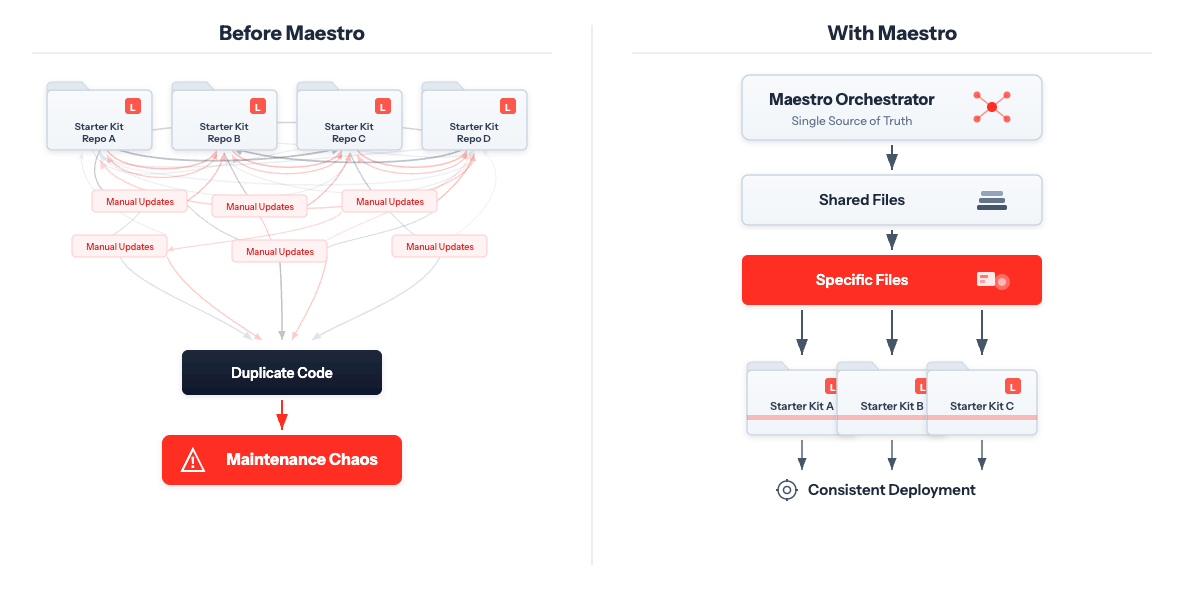
Side-by-side diagram comparing manual starter kit maintenance with the streamlined Maestro workflow.
How Contributors Can Work on Starter Kits Using Maestro
From a contributor's perspective, the workflow is surprisingly straightforward.
First, from the orchestrator directory, you build the starter kit variant you want to work on:
If you already know the exact variant you want, you can build it directly:
This creates a build directory with the runnable version of that starter kit.
Then you start the kit locally, also from the orchestrator directory:
This is where the workflow gets really nice. You do not edit the deeply layered source structure directly. You work on the built kit inside build, which feels like working on a normal Laravel application. Meanwhile, a watcher keeps track of your changes and copies them back to the right places under kits/.
That makes the contribution much more approachable because you can focus on the feature or bug fix, not on remembering the entire internal layering model before writing a single line of code.
When you want to validate your changes across variants, Maestro also gives you dedicated commands for that:
And if you want to narrow the execution to a smaller matrix, you can do that too:
This is a big quality-of-life improvement for contributors. It lowers the cognitive overhead while still giving maintainers confidence that a change behaves correctly across the matrix.
How Maestro Builds the Variants
One of the most interesting ideas in Maestro is that starter kits are modeled as a set of composable layers.
For example, a variant is not stored as one giant independent codebase. Instead, it is assembled from shared pieces and framework-specific pieces.
The build process for an Inertia kit follows a layered composition like this:
For Livewire, the layering is different, but the idea is the same: start from shared foundations, then add framework behavior, then add auth-specific behavior, and finally add more specific features like Teams or Components.
This gives Maestro a few important advantages:
- Shared files only live once.
- Framework-specific overrides stay isolated.
- The build process can produce a full runnable kit from a layered source tree.
- Contributors do not need to duplicate changes manually across every final variant.
If you look at the build command implementation, that is exactly what it does. It copies the base layers into build, then applies the correct stack-specific and variant-specific layers on top.
That means the final built starter kit is not magic, but a deterministic composition of layers.
And honestly, that is the right model for this kind of maintenance problem.
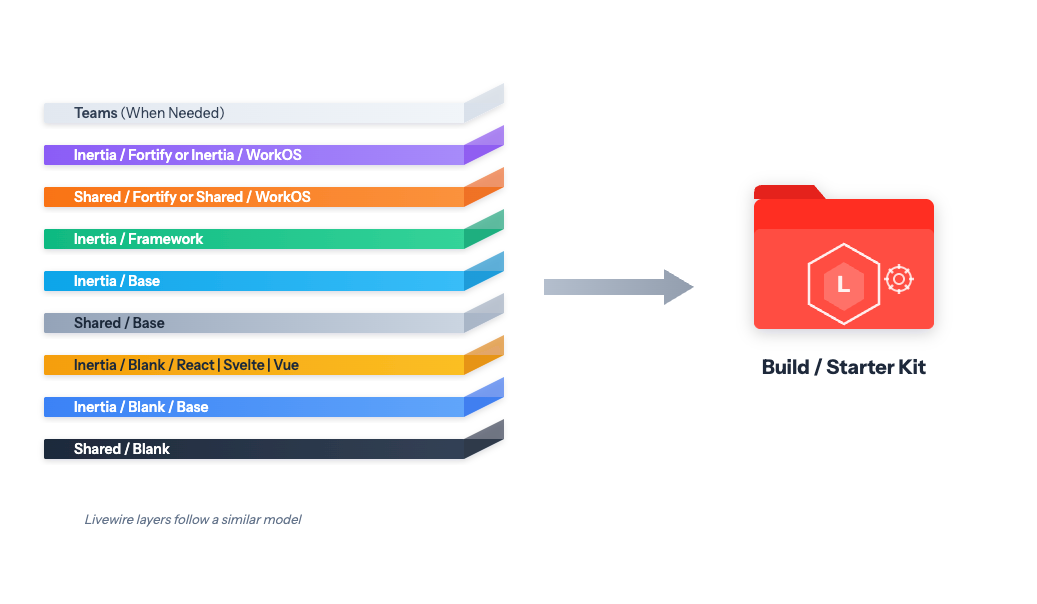 Layered architecture diagram showing how shared, framework-specific, auth-specific, and teams-specific layers combine into a built starter kit.
The Smart Part: Syncing Changes Back to the Right Layer
Building variants is already useful, but the really clever part of Maestro is the reverse direction.
Contributors are expected to make changes in build, not directly in the layered kits/ structure. So the system needs to answer a harder question:
When a file changes in the built kit, where should that change go back in the source layers?
That is where the watcher logic becomes interesting.
Maestro keeps a manifest with the layer order for each kit variant. When a file changes, it checks the active layer set for that variant and chooses the highest-priority folder that already owns that file. If the file does not exist yet, it falls back to the most specific layer.
In practice, that means a change is not blindly copied into a shared folder just because it exists. The sync prefers the most specific valid ownership point, which is exactly what you want if you are trying to avoid accidental cross-variant leakage.
The logic is conceptually very close to this:
That small idea carries a lot of weight. It means Maestro is not only generating starter kits, but also preserving the architecture of the layered source tree while you edit a runnable build.
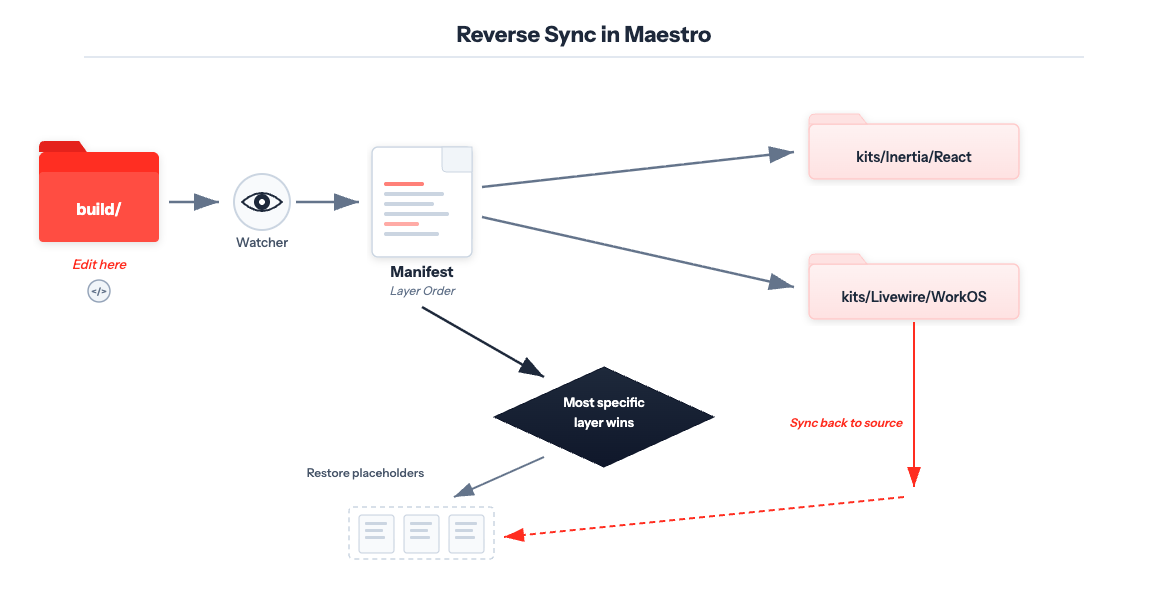 Contributors edit the built starter kit, while Maestro decides where those changes belong in the layered source tree.
Placeholder Restoration Is Another Great Detail
There is another technical detail I particularly like in Maestro.
For Inertia starter kits, some framework-specific page names differ between React, Vue, and Svelte. For example, a page may be called dashboard in React but Dashboard in Svelte and Vue. During the build step, Maestro replaces placeholders with the correct framework-specific values.
That sounds straightforward, but when syncing changes back from build, the watcher needs to avoid hardcoding those framework names into shared source files.
So the watcher restores placeholders before writing files back to kits/.
This means the source layers can keep reusable placeholder values like {{dashboard}}, while the built app still gets the concrete page names required by the chosen framework.
That is one of those details that tells you the tool was designed for maintainability, not only for output generation.
It is also a strong example of something I always value in tooling: protect the source of truth from convenience-specific transformations.
Giving Complexity a Structure
What I like most about Maestro is that it is not trying to hide complexity by pretending the matrix does not exist. The matrix is real. The variants are real. The differences between frameworks are real.
What Maestro does is give that complexity a structure.
Instead of scattering the maintenance burden across many repositories, it centralizes the logic. Instead of asking contributors to memorize how all variants relate to each other, it gives them a runnable environment and a sync mechanism. Instead of treating each starter kit repo as a completely isolated product, it treats them as outputs of a layered system.
That is a much healthier maintenance model.
And for open source contributors, it creates a much better experience:
- Pick the variant you want to improve.
- Build it.
- Run it.
- Make the change in a real application.
- Let Maestro sync the source layers.
- Validate the matrix with the provided commands.
- Open the PR.
That flow is practical, teachable, and scalable.
Pull Requests That Show Why Maestro Works
The best way to understand Maestro is to look at the kinds of pull requests it enables.
Some changes need to reach almost the entire matrix. Others should stay limited to one framework or one feature variant. Maestro makes both kinds of changes much easier to manage.
Here are a few good real-world examples.
Changes That Affect Almost All Kits
#51 - Update Vite ecosystem to v8 across all starter kits
This is a great example of a broad maintenance change. The PR updates the Vite ecosystem across the starter kits, including framework-specific adjustments like the Svelte Vite plugin bump and a React-specific compatibility decision around the Vite plugin version.
This kind of change is exactly where a tool like Maestro shines. Instead of coordinating similar dependency updates across many repositories manually, the update can be made in the layered source and propagated consistently where needed.
#35 - Add password visibility toggle to all starter kits
This one is a product-facing improvement that touches a lot of the matrix. It adds the same usability feature across Inertia kits and Livewire kits, but the implementation is still stack-aware: Inertia gets dedicated PasswordInput components for each framework, while Livewire uses Flux's viewable support.
That is a very realistic example of how Maestro helps maintain consistency without forcing every stack into the exact same implementation.
Changes That Affect Specific Variants
#63 - Add TeamPermission enum for type-safe permissions
This PR is a good example of a feature-scoped change. It only touches the Teams layer, which means the update is shared by starter kits that support teams, while blank and non-team variants stay untouched.
That is one of the biggest wins of the layered model. You do not need to manually remember every affected repository. You change the right layer once, and the correct set of variants gets the update.
#27 - Update prettier config for Svelte and apply linter changes
This one is clearly Svelte-specific. It updates Svelte formatting rules and applies the resulting lint changes only to the Svelte starter kits.
Without orchestration, this kind of framework-specific maintenance can still be annoying because you need to track all Svelte-based kit outputs. With Maestro, the scope is much clearer because the source structure already models that separation.
#46 - Move React TooltipProvider to app root to match new shadcn preset contract
This PR is even narrower: it only affects the React starter kits. The change is tied to React-specific UI behavior and the expectations of the shadcn preset, so it should not leak into Vue, Svelte, or Livewire.
Maestro also helps a lot here. It lets maintainers make highly targeted framework-level fixes while still working within a single orchestrated system, rather than jumping between repositories.
If you look at these examples together, you can see the value very clearly:
- Broad changes can be applied consistently across nearly the whole matrix.
- Variant-specific changes can stay isolated to the exact layers they belong to.
- Contributors and maintainers can reason about scope much more easily.
Try the Laravel Starter Kits
When a project grows from a few starter kits to 21 variants spread across 8 repositories, maintenance stops being about code alone and becomes about system design.
Maestro turns a scattered maintenance problem into an orchestrated workflow. It gives contributors a better way to work on starter kits. And it uses some very thoughtful internals, like layered builds, priority-based sync, and placeholder restoration, to keep the source of truth clean while still making everyday contributions feel simple.
If you want to build with Laravel, the Laravel Starter Kits are the fastest and easiest way to start building your app. If you have tried them and would like to contribute, head to Maestro’s GitHub repository. We appreciate all your contributions!
I may be biased, but I think this is a great example of engineering effort being invested in the right place. Not only in features, but in the process that keeps those features maintainable over time.