How a Non-Technical Creator Built an App with Laravel Cloud & Claude in 5 Days
When Kayla Helmick’s former client and close friend lost her son in a sledding accident, Kayla was asked to help create a website for the family’s memorial fund.
The family needed a place for people to share memories, upload photos, read updates, and understand the fund, which would provide scholarships for band students. A page builder would have covered the basics but not the project’s entire scope.
Kayla is a virtual assistant who works across multiple industries, supporting a marketing agency, a YouTuber, realtors, a general contractor, and the CEO of a web development agency. She had never touched code or built an application from scratch, that is, until she shipped one in 5.5 days using Laravel Cloud and Claude Code.
Here is what she built and how she did it:
No development background. Kayla had never written an app before. Her prior experience with code was limited to small automations in tools like Zapier.
5.5 days from idea to live site, built while juggling other client work.
Full feature set including a media gallery, memory submission system with an approval workflow, blog, embedded video, event management, and email notifications via Resend.
The family manages updates themselves, reducing ongoing maintenance for Kayla.
A Virtual Assistant Focused on Automation
Kayla's work as a virtual assistant centers on automation. She uses AI across client engagements to streamline workflows and help small teams operate without growing headcount.

Kayla Helmick in her home office
That work had always stayed within the boundaries of no-code and low-code tools: AI platforms, Zapier automations, integrations, and creative workarounds.
These systems are fast to set up and easy to maintain, but they have ceilings. When a client needs something custom or dynamic, the options narrow quickly.
The Problem: A Page Builder Would Not Be Enough
When she started the memorial project, Kayla knew immediately that a standard site builder was not the right tool. The family wanted to build something meaningful and lasting. That meant accepting photo uploads and written memories from the community, managing an approval workflow before anything went live, keeping a blog with updates, and directing donors so they could understand the need for funding scholarships and band camp opportunities.
“She needed more than a simple website,” Kayla said. “Her son loved music, and this is a really beautiful way to remember him.”
The feature set, which included a submission system, an approval workflow, and automated email notifications to the mom whenever a new memory came in, pointed toward a real application. Kayla had never built one.
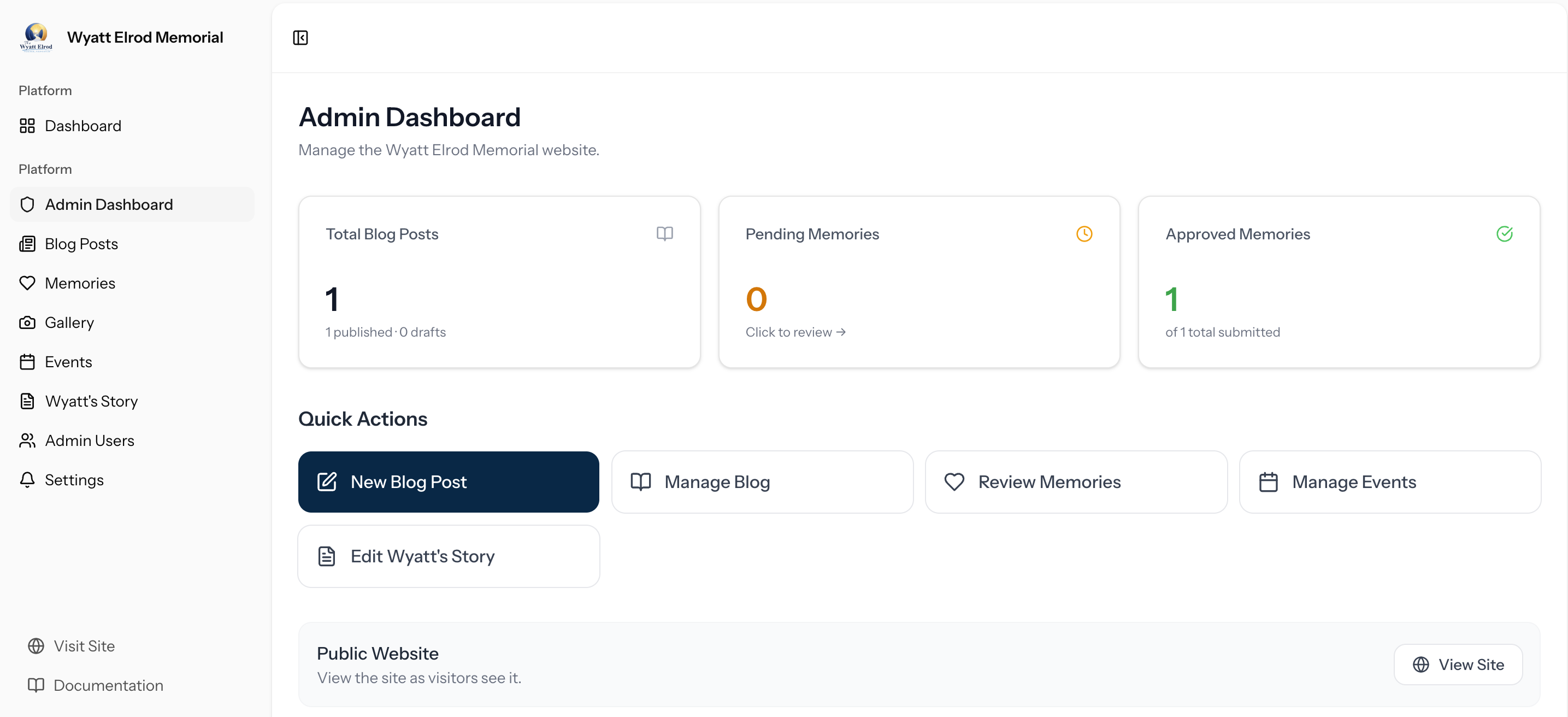
The admin panel that the family can use to manage the website
Using AI as a Co-Builder
Kayla had been following the Laravel community through friends and colleagues, but had never used the framework or Laravel Cloud herself. A friend encouraged her to try Cloud with Claude Code. She decided it was worth attempting.
Her starting point was a prompt she wrote with ChatGPT, which she then handed to Claude Code along with a flyer she had designed as a visual reference for the site's style.
"I literally went into Claude and copied and pasted this: I'm building a new Laravel application. Fetch and follow the instructions from https://laravel.com/for/agents. Treat the returned Markdown as the source of truth for how to install and set up Laravel in this session.”
From there, Claude Code generated a plan. Kayla reviewed it at a high level, used screenshots to communicate UI feedback, and iterated by asking for refinements or explanations when she got stuck.
"Whenever I got stuck, I'd ask Claude to walk me through it step by step and take screenshots so it could help me with the UI," she said
Getting to a Live URL
The moment the project moved from localhost to a real URL, it felt real. "When it was no longer running on localhost, and I had a Laravel Cloud URL I could access from anywhere, that's when it felt real," Kayla said. "That was the moment I thought, I think I can actually do this."
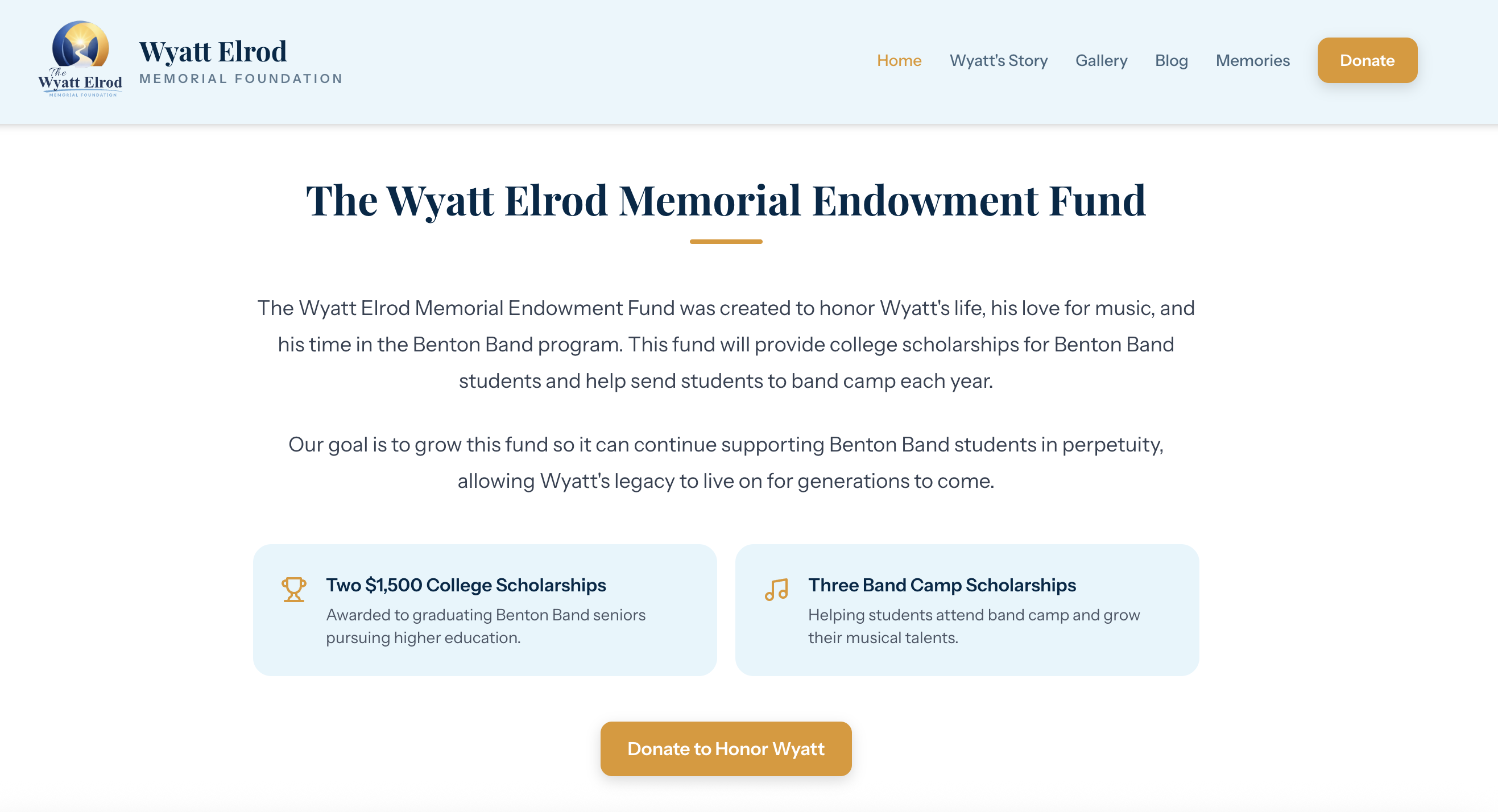
She pushed the project to GitHub and connected it to Laravel Cloud without major friction. For transactional email, she hooked up Resend so Wyatt’s mother would receive a notification whenever someone submitted a new memory.
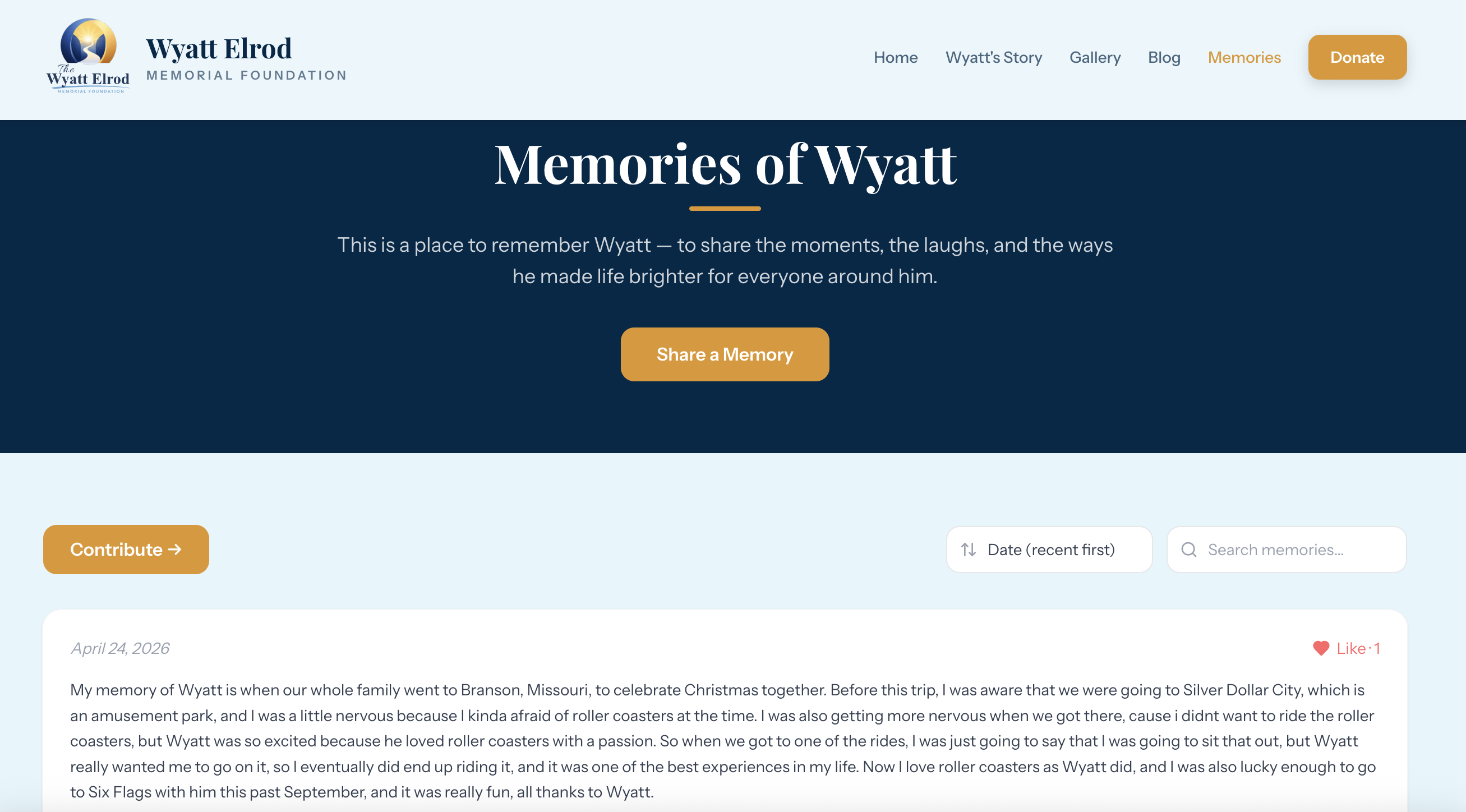
What Shipped in 5.5 Days
The final application included:
A large media gallery for community photo uploads
A memory submission system with an approval workflow before memories go public
Email notifications via Resend sent to the family when new memories were submitted
A blog for ongoing updates from the family
Embedded video content, such as a tribute to Wyatt's life, shared at his funeral service
Event management features, so events can be created and managed on the website
A donor-facing section explaining the scholarship fund and band camp opportunities
The family can manage and update much of the content themselves, which was a priority from the start.
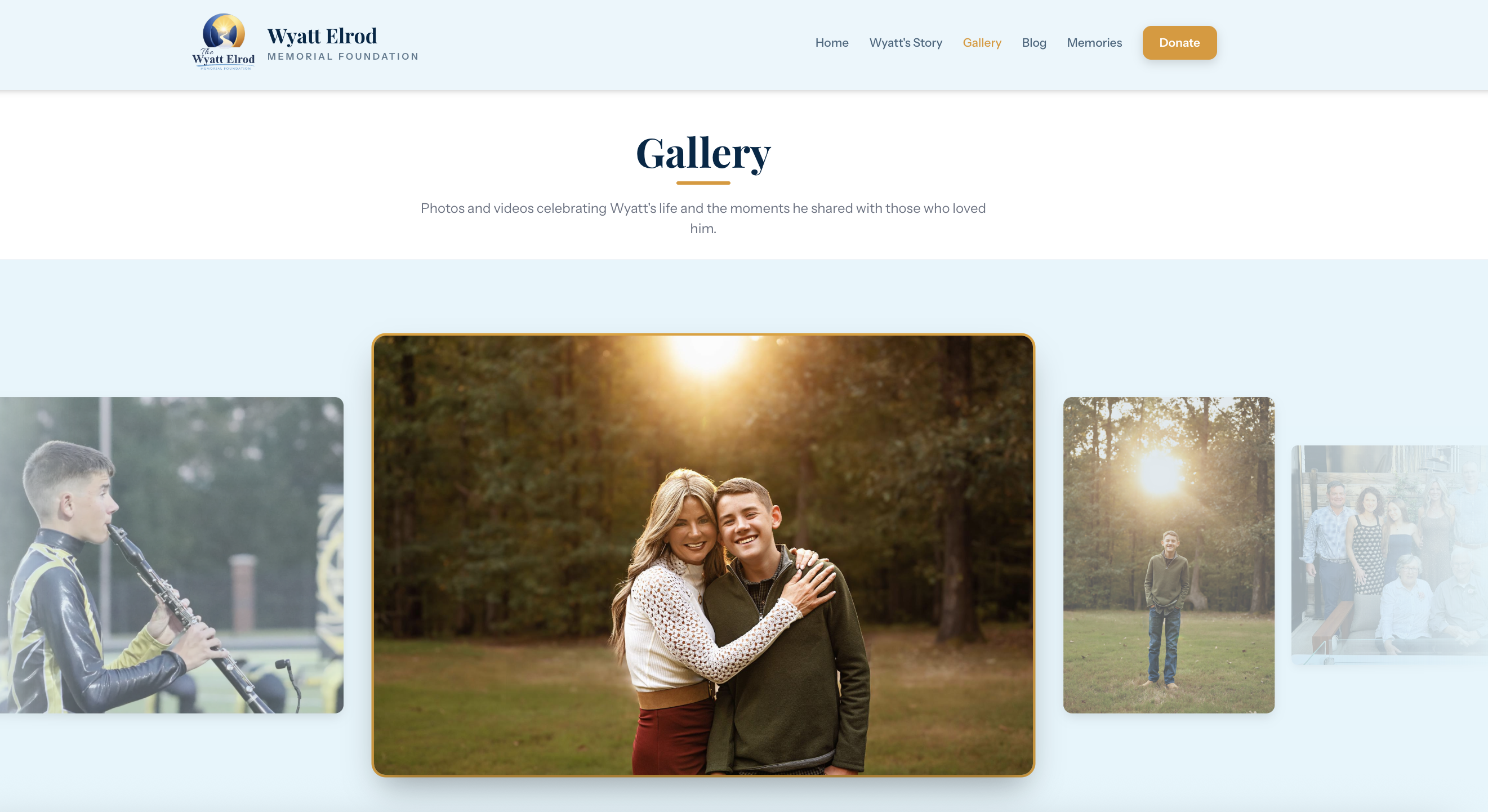
"It likely would have existed [as a simpler site], but more as a basic website without much functionality," Kayla said, describing what the alternative would have looked like. "I was able to include a large media gallery, a blog, a memory submission system with an approval workflow, embedded video content, and event management features."
Faster than Expected
Kayla expected more friction. What she didn’t expect was for the project to move this fast.
"Honestly, how fast it came together," she said. "And as new features were requested from the family, it was much easier than I expected to implement them."
She hit usage limits on Claude Pro during the build, causing interruptions. Outside of that, the process held together. (You can also check which AI agents work best with Laravel.)
She was also building during the week Claude Design launched. She did not have it for this project, but has since started experimenting with it on new personal projects.
The Bigger Picture: What This Opens Up
Kayla is already applying what she learned to a personal project: a meal-planning app for her family that connects recipes, macros, weekly planning, and grocery lists, all synced to Todoist.
"Before, I was limited to tools like Zapier or spreadsheets, along with things like skills, routines, and scheduled tasks in Claude or ChatGPT," she said. "Those are great, but they don't always work the way you need them to."
Kayla has a balanced take on what AI can and cannot replace. "I still think developers are absolutely essential, especially for scalable, production-level applications and anything involving payments or security. And the same goes for UX/UI designers. There's a level of polish and user experience that AI just doesn't consistently get right yet. But for internal tools for clients and personal use, this opens up a completely new world."
Advice for Non-Technical People Considering AI Development
Kayla's recommendation is to just try it.
"Burn some tokens and see what happens," she said. "I've always had a lot of ideas, but never really had a way to implement them."
She also has a practical note for anyone who starts down this path. "Don't just rely on it. Try to understand what you're building as you go. Having a basic understanding of how the app works is a huge help. You can literally ask the AI to explain things to you as you build. Sometimes AI will get itself into a loop and can't solve a simple problem, but if you understand enough about what you've been building, you can usually guide it and get it unstuck, even if you don't know exactly what the issue is."
You Don’t Have to Be a Developer to Try Laravel Cloud
Kayla's entry point to Laravel Cloud was a community announcement at Laracon. She was there to support a friend, not to build anything. A year later, she had shipped a real application.
"The barrier to entry is so low right now," she said. "Just try it and learn something new."
If you have an idea and are not sure whether you need to be a developer to build it, create a Laravel Cloud account (with $5 in usage credits) and find out.
More Resources on How You Can Build With Laravel and AI
Zero-to-Deployed for Non-Developers
A walkthrough of building and deploying a real Laravel app from scratch using Claude Code, Laravel Boost, GitHub, and Laravel Cloud, with no local dev environment and no prior technical knowledge required. If Kayla's story made you want to try it yourself, this is where to start.
The Laravel AI SDK lets you add AI capabilities directly into a Laravel application without wiring up each AI provider separately. In practice, that means your app can generate text, create images, transcribe audio, or run intelligent workflows using models from OpenAI, Anthropic, Google Gemini, and others, all from one place. For someone building a client tool, it could power things like automatic email drafts, smart form responses, or lead qualification, without needing to become an AI engineer.
MCP (Model Context Protocol) is a standard that lets AI tools like Claude or Cursor connect directly to your application and ask it questions. Instead of an AI agent guessing how your app works, it can query your actual data, read your real content, and take actions inside your app. For a non-developer, the practical upside is that you can build apps that your clients interact with through AI chat interfaces, without them needing to log in to a dashboard or learn new software.
Kayla Helmick - Virtual Assistant
Problem
Little to no coding experience.
Solution
Laravel Cloud and Claude Code enabled Kayla Helmick to deploy an app with a full feature set, including a blog, embedded video gallery, and event management features.
Subscribe to the Laravel Blog
Stay connected with Laravel and receive news in your inbox.