On December 4, we released Laravel Wrapped, giving Laravel developers a personalized year-in-review of everything they shipped with Laravel Cloud and Forge and tracked with Nightwatch. Think of Spotify Wrapped, but for everything you shipped.
Cloud and Forge users received their annual review in their inboxes: a note of appreciation from us to them for being part of the Laravel community. Laravel Wrapped showcased deployment counts, shipping streaks, midnight deploy habits, most-used Git commit messages, and even AI-generated insights unique to each user, complete with a chat panel that answered questions about their yearly data.
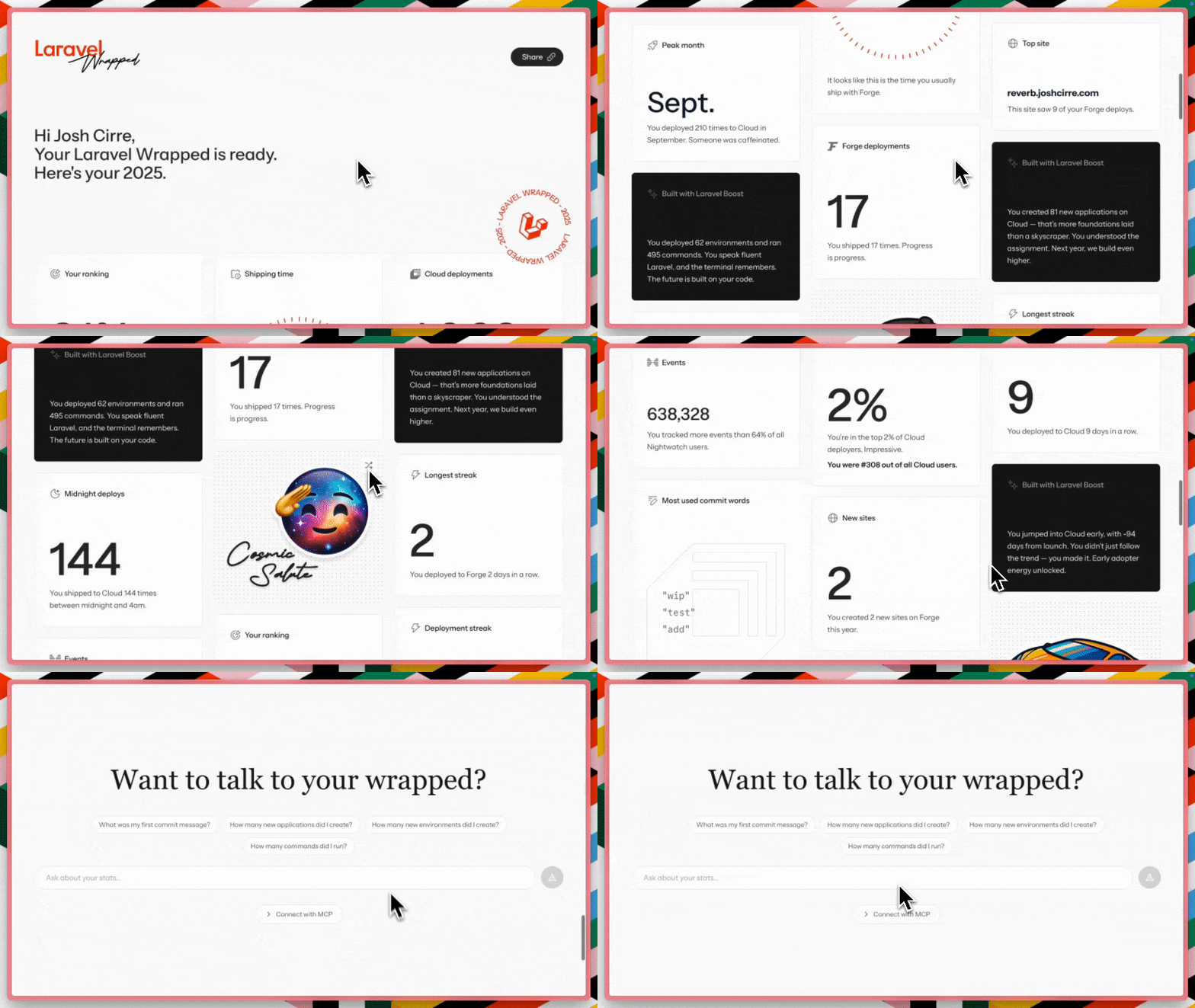
The entire project was built in under two weeks, which wouldn’t have happened without the speed Cloud brought to the table, alongside Laravel Boost and MCP (Model Context Protocol).
Whether you're new to Cloud or a longtime user, you can explore the docs to see how easy it is to deploy your own projects with the same tools we used to build Wrapped.
The Challenges Behind Laravel Wrapped
Behind the scenes, building Laravel Wrapped presented our team with interesting technical challenges:
- Aggregating data across multiple products
- Generating thousands of personalized AI summaries
- Creating shareable open graph (OG) images on the fly
And, as we already mentioned, shipping it all in under two weeks.
“We couldn’t have built it as quickly as we did if Laravel Boost didn’t exist,” said Josh Cirre, Developer Relations Engineer at Laravel.
Josh leaned heavily on Boost, Laravel’s AI sidekick, to develop the entire application. Boost equips AI agents with Laravel-specific tools and documentation through an MCP server, transforming them from search engines into experienced Laravel developers.
Aggregating Data Across Three Products
The first hurdle was gathering user data from three separate Laravel products: Cloud, Forge, and Nightwatch. Each product structures its data differently, and there's no unified authentication system linking them all.
“Each individual's link is a custom UUID. It was the easiest thing to do without having to dive into product authentication differences between Cloud, Forge, and Nightwatch," explained Josh. "So we just went with email." The solution was to match users by email address across all products, then generate a unique UUID for each person's personalized Wrapped experience.
The workflow looked like this:
- Export product usage from Laravel’s marketing database to CSV.
- Run multiple queries to normalize the data.
- Build a custom Artisan command to merge everything by email.
- Generate one UUID per user and write all fields into a database row.
Josh accessed Laravel's marketing database, which mirrors production data (excluding sensitive information). Using SQL queries with help from Claude AI, he exported data to CSV files. "By the end of it, I had gotten to the point where I was able to have just one really long SQL query that generated one huge CSV," Josh said.
The final export happened on November 30, capturing an entire year's worth of deployments, commits, and events. Josh ran separate CSV exports for Cloud, Forge, and Nightwatch, and a single unified CSV for Nightwatch events.
Building the Backend: Artisan Commands and Database Design
With the CSVs in hand, Josh built a Laravel application to process and serve the data. The backend consisted of custom Artisan commands that iterated over the CSV files and consolidated data into a Postgres database.
"Essentially, each user has one row, and I don't know how many columns at this point. I think there's probably close to 70 or 80," Josh said. Each row contained different stats like Cloud deployment times, Forge shipping times, and even hour-by-hour deploy patterns. "Midnight deploys were probably the most fun part. We captured deploys per hour in UTC, then calculated ranges like 12 to 4 a.m. in the user's timezone."
The choice of Serverless Postgres was practical: "Within Laravel Cloud, it's really easy to click view credentials, and I can connect it to TablePlus locally, and then I just copy things over," Josh explained. This made it simple to replicate the local database to production when launch time came.
To ensure data import commands were generated and executed as cleanly as possible, Josh relied on Boost and the tools it provides AI assistants. Boost helped confirm and write a lot of the import commands to go from CSV file to live data.
The AI-Generated Insights: 55,000 Prompts
One of Wrapped's most delightful features was the personalized AI-generated summaries, like how many days you have been using Cloud since launch. Each user received unique insights based on their data.
This required running OpenAI prompts for every single user. "We essentially had to run like 55,000 prompts," Josh said. The first attempt didn't go well. "I ran it for like a day, and it only had finished 5% of everything." After canceling that approach, Josh batched the prompts in groups of a thousand. "That took like an hour after that."
The prompts were designed to prioritize interesting stats. "There are some prompts to say, okay, here are the top three things that you should try to pull from. If there's nothing crazy or flashy about that, then look at different columns," Josh explained. The AI would pick from various data points, even ones not displayed on the main cards, to generate three unique insights per user.
These AI summaries were pre-generated and stored in the database, avoiding the need to generate them on the fly during the launch traffic spike.
The Frontend: React, Inertia, and Attention to Detail
Developer Relations Engineer Leah Thompson built the frontend using React, Inertia.js, and Tailwind CSS. "The whole app is built out using React, Inertia.js, Laravel, and Tailwind," she said. "I think it was built out in four to five days."
Just like Josh, Leah also used Boost to develop Wrapped’s frontend, leveraging Boost’s browser logs to expose client-side JavaScript errors and console output to AI agents. “This made frontend debugging way easier since the AI was able to see what was actually happening in the browser,” Leah said.
The design featured a staggered grid layout, with cards of varying heights creating visual interest. "We have them kind of staggered based on the column," Leah explained. "And then also the on-page load animation, they're randomized so that each card doesn't load in at the same time."
The stickers, created by Product and Marketing Designer Tilly Tokdemir, added personality. They featured a dot matrix effect and could be rotated for variety. "Each one of these stickers can kind of rotate to give a little bit more pop," Josh noted.
The collaboration was described as a "triangle" between design, frontend, and backend teams working continuously. Josh handled backend work while Tilly and Leah worked on design and frontend, respectively. Product Design Lead Jeremy Butler contributed by working directly on the homepage design.
The Share Modal: A Technical Puzzle
The share feature was the most complex frontend challenge. Users could drag and drop stickers, select which stats to display, customize themes, and toggle their name visibility. When finished, they'd get a shareable link with a custom OG image matching their exact configuration.
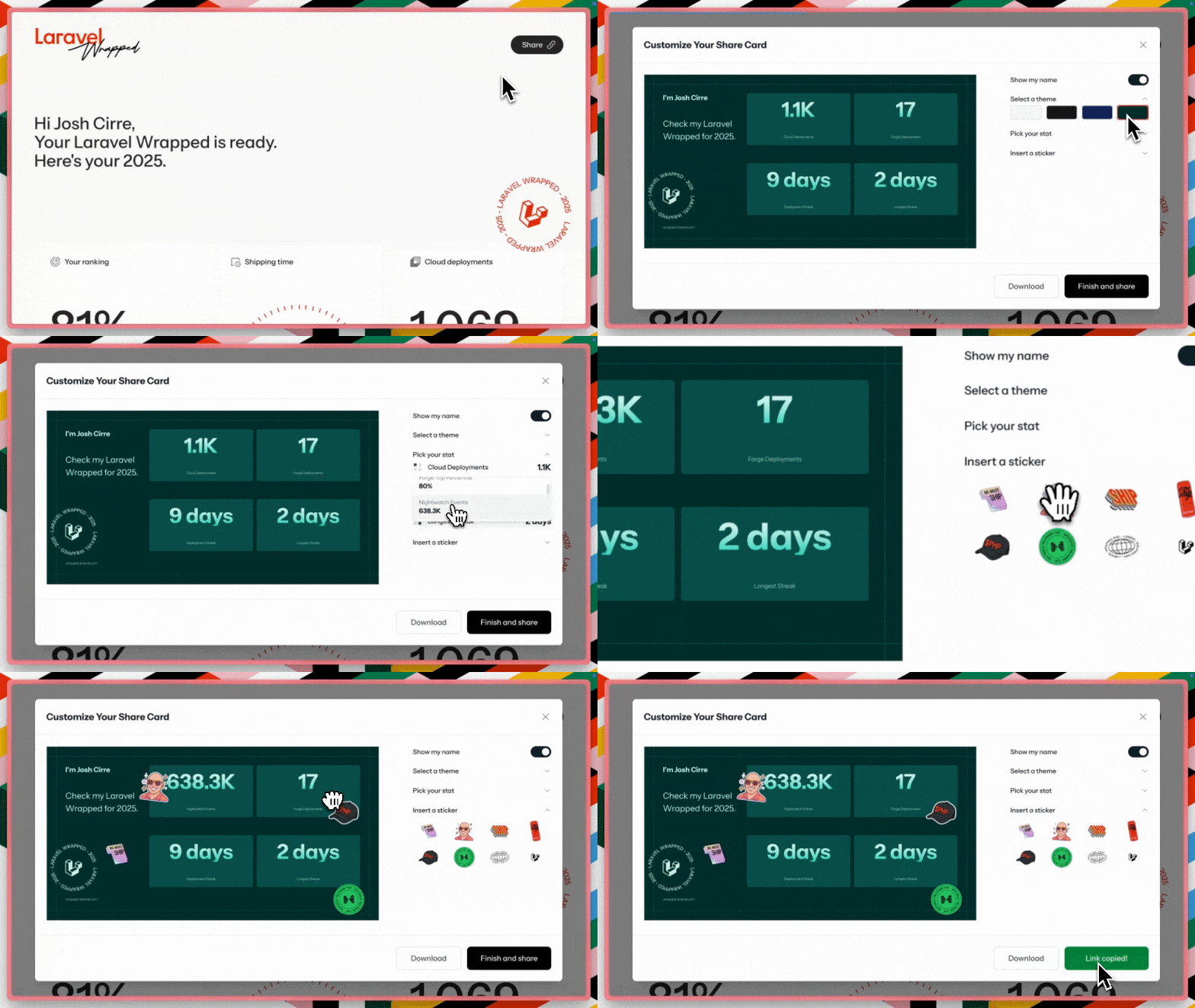
"This was probably the most time-consuming part for the front end," Leah said. The drag-and-drop functionality used DND Kit, a React library for building sortable interfaces. Users could place stickers anywhere on their share card, pick from available stats (filtering out ones already displayed), and see their changes in real time.
The trick was syncing two separate components: the interactive React share modal and the server-rendered OG image. "What you're seeing as the share card here, this is a React component," Leah explained. "But then the OG image that you see when you share your card is actually rendered by an OG template Blade component. So those two components are actually kind of separate, but you need them to be in sync."
Josh initially tried using Inertia for the OG images. "You have to wait for the JavaScript to load, and then it downloads the database queries and generates this dynamic OG. When you're sharing to X and LinkedIn and stuff like that, that takes too long." The solution was using Blade for server-rendered OG images while keeping the rest of the site in Inertia.
The team used OG Kit by Peter Suhm for the OG image generation. Every shareable link included a cache-busting parameter. "This does the cache busting for the link so that if you share it on Slack or X or anywhere, you're always seeing the updated OG image."
The Highlight: Laravel MCP in Action for the Chat Feature
Each Laravel Wrapped page included a chat interface where users could ask questions about their data. "I can ask, ‘How many applications have I created?‘ and it answers me based on the information that it has," Josh said.
To build the foundation for this functionality, Josh turned to Boost again, borrowing many prompts and system instructions. The chat used the Laravel MCP package to set up a remote server to handle prompts. "All of these stats that we can chat with on the website are technically not MCP," Josh clarified. "This is using Stream and some of the Inertia stuff that shipped this year, while also using the OpenAI PHP package."
However, MCP powered the backend prompts, ensuring the chat only returned information about that specific user. "We had the prompts ready for the chat to make sure it's actually only returning data from that particular person," Josh said.
Laravel Cloud Made the Difference
Throughout the project, Laravel Cloud's features removed typical deployment friction. Josh chose Serverless Postgres to leverage Cloud’s database management capabilities and simplify the migration of local data to the production database.
Cloud's preview functionality allowed the team to test in production before the official launch. "We use the Cloud URL to check that all is working in production. Then we just have to shift the domain. Having that technically hidden URL, at least hidden by obscurity, was super nice because it wasn't just us working on our local machine anymore," Josh explained.
The deploy speed proved crucial during the launch meeting. "During testing, we launched at around 9:30 a.m. PT, and we had a launch meeting that was like an hour or something long," Leah recalled. "Whenever someone suggested changes, I’d push a fix. Since we were working on Cloud, we’d see the changes go live within two minutes. We were able to refresh it, and instantly everyone saw all the updates."
The ability to quickly revert was equally important. "If we did push something that did break something or whatever, we could easily revert it," Leah added.
Build Your Own Wrapped
Laravel Wrapped showcases what's possible when you combine Laravel's ecosystem with a platform like Cloud, which removes infrastructure and deployment complexity.
If you want to build something interactive, personalized, and shareable, Laravel Cloud is a solid foundation. The team aggregated data across multiple products, generated tens of thousands of AI insights, built a React frontend with sophisticated sharing capabilities, and shipped it all in two weeks. That’s what happens when deployment friction disappears.
Go build something fun on Laravel Cloud. We might send you your own Laravel Wrapped next year.