How Filament Achieved 3x Faster Requests by Migrating from Laravel Forge to Cloud
When Dan Harrin and his team launched a major rebrand of the Filament website, traffic surged beyond what they had provisioned for. They scaled their server up twice (from $25 to $50, then to $100 per month) before finding a size that could handle the load.
It is a familiar challenge for any project that experiences unpredictable traffic. You either overprovision and pay for resources you do not need most of the time, or you right-size your server and risk not being able to handle spikes.
For one of the most popular open source projects in the Laravel ecosystem, that guessing game was becoming unsustainable. Today, Filament runs entirely on Laravel Cloud.
Some highlights:
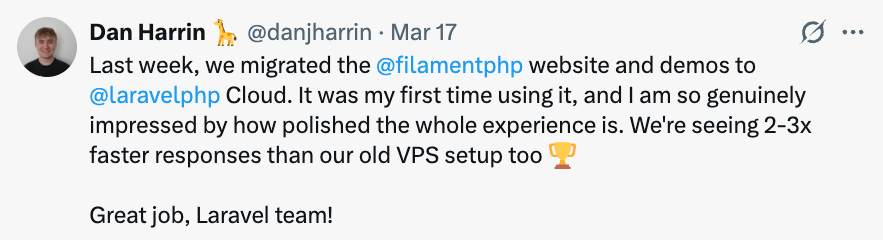
Request speeds improved by 3x compared to their previous Laravel Forge setup.
The Filament site and demo have served 34 million network responses in just two weeks without manual intervention on scaling.
Each Laravel Cloud replica uses 4x fewer resources than their previous server, scaling up only when needed.
Dan migrated to Laravel Cloud in just three hours as a first-time user.
If you're considering migrating, read our Laravel Forge to Cloud migration guide.
What Is Filament? Scale and Challenges
Filament is an open source set of full-stack components for the Laravel ecosystem. It gives Laravel developers tools like a form builder, table builder, notification system, charts, and dashboard widgets, removing the repetitive UI work involved in building admin panels, content management systems, CRMs, and other information systems.
The project has been installed 23 million times, with roughly 60,000 daily installs. Over 700 community plugins from hundreds of authors are published on the Filament website. In the last 30 days, Filament's web properties have handled 134 million requests from approximately 466,000 unique visitors.
Dan, who describes himself as the “keeper of the servers” is the only developer responsible for infrastructure. He maintains two deployed applications: the main Filament website (which handles marketing, the blog, podcast links, and the plugin directory with its approval workflow) and a separate demo application that lets developers try Filament online without signing up. The demo data resets every hour via a scheduled task.
The Breaking Point: When Scaling Up Means Getting Stuck
Filament had been running on Laravel Forge since the beginning. Dan was familiar with the setup and comfortable managing it. But every major release or website update brings a flood of visitors to the site. Everyone shows up at once to check out the new documentation and features, and the server needs to handle it.
When the rebranded website launched, the $25-per-month server could not keep up. CPU spiked, and Dan scaled to a $50 server to the same result. He eventually landed on a $100-per-month server that could handle the traffic.
When I'm considering what infrastructure decisions I'm making, I'm trying to make safe bets, and Cloud felt like a safer bet.

However, the real problem wasn’t the cost of scaling up, but the inability to scale back down on Laravel VPS.
That is when he attended Laracon EU and spoke with members of the Laravel team. They offered support either by staying on the VPS or by moving to Laravel Cloud. Dan chose Cloud.
Unlocking One-Click Octane with Cloud
Moving Filament from Forge to Laravel Cloud delivered an immediate 2x speed improvement on average across endpoints, both on the website and the demo. But it was just the starting point. Dan had built both projects to be Octane-compatible, but he had never enabled Laravel Octane on his Forge servers.
"I didn't really want to take the risk and install FrankenPHP on a Forge server myself and handle how that was going to be configured and scaled. It is a different way of running PHP, and I don't have experience handling traffic spikes with FrankenPHP," he said.
On Laravel Cloud, Octane was a one-click option. Dan enabled it without worrying about server configuration, FrankenPHP setup, or how it would behave under load. If something went wrong, he could just turn it off again.
The move made the initial 2x improvement jump to a 3x improvement in request speed.
Dan could have configured Octane on Forge. Forge even has one-click options for it now. But on a self-managed server, he would be responsible for troubleshooting any configuration issues. On Cloud, that responsibility shifts to the platform.
"It's more peace of mind," Dan said. "When I'm considering what infrastructure decisions I'm making, I'm trying to make safe bets, and Cloud felt like a safer bet."
Moving to Autoscaling Infrastructure by Default
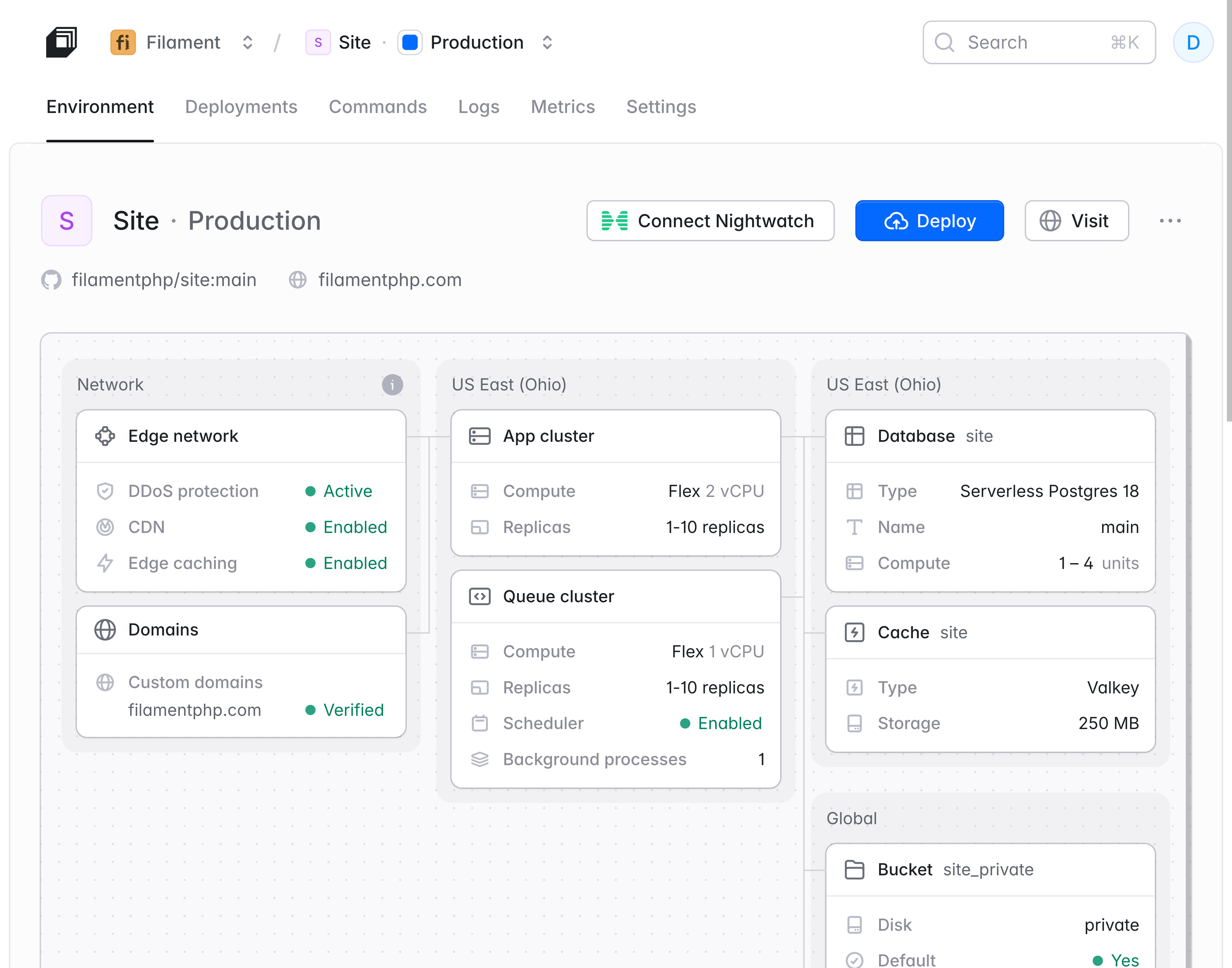
Besides Octane, Cloud changed how Filament's infrastructure was organized in several important ways:
Smaller Replicas, Smarter Scaling
One of the most notable differences in Filament's new setup is how much less infrastructure it uses day-to-day. Dan's Forge server was provisioned with 8 GB of RAM and 8 CPUs. Each Cloud replica runs with 2 GB. That is 4x smaller per instance.
On an average day, Filament runs on one or two replicas. During spikes in the last two weeks, it has scaled up to as many as 10. But those spikes are temporary. The infrastructure scales back down automatically when traffic returns to normal.
Serverless Postgres
On Forge, Dan's database lived on the same server as the application. On Cloud, it moved to a Serverless Postgres instance. Dan had initially worried about latency from an external database connection, but the overall speed improvements were so significant that the concern disappeared entirely.
The serverless database was especially valuable for the demo application. Every hour, a scheduled task creates an entirely new set of data and swaps it in. Previously, that heavy operation ran on the same server and database that also handled live user requests. It would spike metrics and degrade the experience for demo users.
With Cloud, the worker cluster that runs the data reset is separate from the application servers, and the serverless database scales to absorb the extra load without affecting users.
Laravel Valkey
Filament uses the fully managed, Redis-compatible Laravel Valkey on Cloud for caching, with autoscaling available. On Forge, there was no serverless option for Redis.
Worker Clusters
The website uses a worker cluster to process its database queue, sending emails about plugin approvals, fetching download counts and GitHub stars, pulling pricing data for paid plugins from external services, and running scheduled jobs.
This is the core problem that Cloud was designed to solve. Instead of paying for a large server that sits mostly idle to handle occasional traffic spikes, Cloud provisions small replicas and adds more only when needed for added peace of mind.
Migrating to Cloud in Three Hours as a First-Time User
Dan migrated both applications to Laravel Cloud with minimal disruption.
For the main website, he put only the admin panel (used for plugin approvals) into maintenance mode to prevent writes. The public-facing site stayed online the entire time. He exported the database (about 25 MB) and the S3 bucket (about 2 GB), imported them into the Cloud environment, verified everything was working on the preview URL, and swapped the DNS.
This meant a total admin panel downtime of roughly one hour, most of which Dan attributes to wrestling with his file transfer client rather than anything related to Cloud.
The demo was even simpler. Since the data is generic and resets every hour anyway, Dan just deployed a fresh instance and swapped the DNS without downtime.
From the first Cloud setup to full migration, the entire process took about three hours across both applications. This was Dan's first time using Cloud.
"Even as a new Cloud user, it was easier and faster for me to set up apps on Cloud than it was on Forge, even though I'm a long-time Forge user," Dan said. "Cloud did have a lot more for me. Even simple things like injecting the correct environment variables based on the infrastructure I've got set up."
Infrastructure Costs in Context
Dan's previous monthly infrastructure spend came to roughly $155/month: $100 for the website server, $25 for the demo server, $12 for his Forge subscription, $9 for error tracking, and about $10 for Cloudflare.
His Cloud estimate for two weeks came in at $150, with $103 going to the serverless database and only $37 to the application servers. It is worth noting that these two weeks included several traffic spikes, a pattern typical of Filament's traffic.
While the raw numbers are higher on Cloud, Dan sees it as a fundamentally different setup. The autoscaling, serverless database, Octane, worker clusters, and the ability to scale down are capabilities he did not have before.
To reap the benefits he’s now getting on Cloud, he would have had to manage at least 4x the number of servers (one server for the database, one server for load balancing, and two app servers).
"It's like comparing apples to oranges," he said. "It's more powerful. It allows us to autoscale. We're paying for different things. I think it's definitely worth the cost. I don't think I'd move back."
Try Laravel Cloud
Dan's recommendation is straightforward. Just try Laravel Cloud. Set up a preview domain, deploy your own project, and feel the difference without any risk to your existing infrastructure.
"The Laravel Cloud demos are good, but they don't do Cloud justice in the same way as deploying your own site does," Dan said. "It unlocks a lot of things for you. Octane, Serverless Postgres, Valkey. The quality of the infrastructure you're getting is worth it, and the peace of mind that you're not the one managing the server is worth it."
Try Laravel Cloud for free and see for yourself. If you are currently on Forge and considering the move, check out the Forge vs. Cloud comparison to understand which product fits your needs.
Filament

Problem
Unpredictable traffic spikes from releases and rebrands kept outpacing manually provisioned Forge servers, forcing repeated scaling (from $25 to $50 to $100/month) with no ability to scale back down, plus a demo app whose hourly data-reset jobs degraded performance for live users.
Solution
By migrating to Laravel Cloud, Filament achieved 3x faster request speeds (via one-click Octane), cut per-replica resource usage by 4x with autoscaling, and offloaded its demo's hourly reset jobs to a separate worker cluster and Serverless Postgres instance, eliminating the impact on live users. The full migration took just three hours.
Talk to a Cloud expert
Let the Laravel team design the right infrastructure configuration for you.
Contact sales