Blog /

Product

Product June 24, 2021

Deploying your Next.js App To Forge

Next.js is a React framework developed by [Vercel](https://vercel.com). It includes functionality such as server-side rendering and static site generation. Today we’ll explain how you can deploy your Next.js application with [Laravel Forge](https://forge.laravel.com). If you’re following along with your own Forge server, ensure that the server is a “App” or “Web” server so that Nginx is installed. In this post, we’ll explain how to deploy your site using the Next.js server-side rendering feature. ## Creating An Nginx Template To use server-side rendering, we first need to create a new [Nginx Template](https://forge.laravel.com/docs/1.0/servers/nginx-templates.html) in Forge. We’re using an Nginx Template here so that we don’t need to modify our site’s Nginx configuration later. We’ll create a new template with a name of “Next.js App” and then update the contents of our template: ```nginx # FORGE CONFIG (DO NOT REMOVE!) include forge-conf/{{ SITE }}/before/*; server { listen {{ PORT }}; listen {{ PORT_V6 }}; server_name {{ DOMAINS }}; server_tokens off; root {{ PATH }}; # FORGE SSL (DO NOT REMOVE!) # ssl_certificate; # ssl_certificate_key; add_header X-Frame-Options "SAMEORIGIN"; add_header X-XSS-Protection "1; mode=block"; add_header X-Content-Type-Options "nosniff"; index index.html index.htm; charset utf-8; # FORGE CONFIG (DO NOT REMOVE!) include forge-conf/{{ SITE }}/server/*; location / { proxy_pass http://127.0.0.1:3000; } location = /favicon.ico { access_log off; log_not_found off; } location = /robots.txt { access_log off; log_not_found off; } access_log off; error_log /var/log/nginx/{{ SITE }}-error.log error; location ~ /\.(?!well-known).* { deny all; } } # FORGE CONFIG (DO NOT REMOVE!) include forge-conf/{{ SITE }}/after/*; ``` You may notice that the `location /` block is using `proxy_pass`. Server-side rendering in Next works similar to PHP, the server keeps a process running that generates the content and serves it to the client. With Next.js, we’re using Node, so we’ll pass our requests to the Next.js server via port `3000`. You can change this based on your project requirements. ## Creating The Site With the Nginx Template created we can now create our site, making sure that we select the “Next.js App” Nginx Template option: ![Creating a new site](https://laravel-blog-assets.s3.amazonaws.com/tifX6Qp2JU3dW6f5AYzYqUHemwNYwaAEPG894Pya.png "Creating a new site in Forge") Once Forge has created the site, we can install our repository from our chosen Git provider. ## Deployment Script The next step is to update the site’s deployment script: ```sh cd /home/forge/next-app-static.curved-feather.test git pull origin $FORGE_SITE_BRANCH npm install ``` We can now deploy our site with the updated script to have our NPM dependencies installed. If we browse to our site now, Nginx will give us a 502 error. This is because we’ve yet to start the Next.js server. To do, this we’ll create a new Daemon on the server. For the daemon, we only need to provide the directory of our site and the command; `npm run start`. ![Creating a Daemon](https://laravel-blog-assets.s3.amazonaws.com/ICmgY8IM74BmLj52RKHx0U0BIyCH5DLtr4UldXiW.png "Creating a Daemon") Once the Daemon is configured and becomes active, we can visit our site and see that it is now working.

James Brooks

Product June 18, 2021

Deploying Your Nuxt.js Site To Laravel Forge

Nuxt.js is a framework for generating static websites using Vue.js. Today we’re we're going to explore how to deploy your Nuxt.js application with [Laravel Forge](https://forge.laravel.com). If you're following along with your own Forge server, ensure that the server is a "App" or "Web" server so that Nginx is installed. ## Creating The Site First, we’ll need a site to deploy our application. In this example, we’ll use `nuxt-app.laravel.com` as our domain name but you should assign the site a domain name that you control, or name the site `default` to access the site by the server's IP address. As Nuxt.js doesn’t use PHP, we can also change the project type to “Static HTML”. Finally, we will also need to modify the “Web Directory” to `/dist`. The `dist` directory is where Nuxt.js generates the compiled version of our website that should be publicly available. ![image](https://laravel-blog-assets.s3.amazonaws.com/iB11j41NTBk23GAxaAiYL8iWGp4fAbQQCX1uSxAY.png "Creating our new site...") ## Installing The Repository With our site now configured, the next step is to install the repository that we want to deploy. We’ll select “Git Repository” and then enter our repository details. As our project is not using PHP, we can disable the “Install Composer Dependencies” option. ## Configuring The Deploy Script With static sites, you should avoid committing the generated site to your Git repository as it’ll very quickly grow in size. Instead, we’ll use our site’s deploy script to generate the site for us. To do this, we can update our deploy script to do two additional tasks: 1. Install NPM dependencies. This will include the `nuxt` command that we need. 2. Generate the site. We’ll update our deploy script like so: ```bash cd /home/forge/nuxt-app.laravel.com git pull origin $FORGE_SITE_BRANCH # Add These Two Lines... npm ci npm run generate ( flock -w 10 9 || exit 1 echo 'Restarting FPM...'; sudo -S service $FORGE_PHP_FPM reload ) 9>/tmp/fpmlock ``` ## Deploy! With these additional lines we can now deploy our application. Once the deployment has completed, we’ll now be able to access our site. And there we have it, we've deployed our Nuxt.js site with Forge.

James Brooks

Product June 16, 2021

Vapor: API Gateway vs Load Balancers

When using an AWS serverless infrastructure powered by Vapor, you have three different options to consider when determining how to route traffic to your application: API Gateway v1, API Gateway v2, and Load Balancers. In this article, we are going to compare these three options in terms of performance, pricing, and features.

Nuno Maduro

Product June 14, 2021

Envoyer: Infrastructure Upgrades

On June 12th we upgraded Envoyer's infrastructure, which allowed us to migrate to PHP 8, Laravel 8, and Spark Next. Due to the upgrades, it means that Envoyer is now using new IP addresses. We emailed all subscribed customers on Wednesday June 9th advising that any firewalls were updated with these new IP addresses. Envoyer's new IP addresses will always be up to date within our [documentation](https://docs.envoyer.io/1.0/introduction.html#envoyer-ip-addresses). For convenience, the new IP addresses are listed below: - 159.65.47.205 - 157.245.120.132

James Brooks

Product June 1, 2021

Forge: May Round-Up

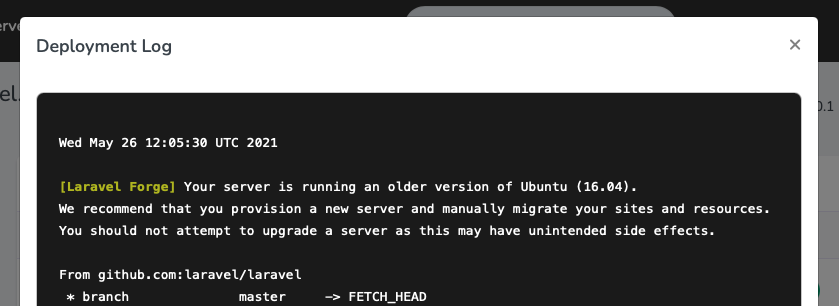
A whole month has flown by since our [last post](https://blog.laravel.com/forge-april-round-up) which rounded up all of the things we shipped to [Laravel Forge](https://forge.laravel.com) in April. This month we've also been refactoring parts of Forge, laying the ground work for some exciting new things... SSL Default Sites ----------------- When Forge provisions an App or Web server it creates a "default" site. This site is served by Nginx when a request is made to your server for a domain that has not been configured. Previously, when a server had configured SSL for one of its domains, Nginx would avoid using this default site and instead serve the first domain that was listening on port 443. To prevent this, Forge will now create a default site for SSL requests as well. Site Log Improvements --------------------- The Log panel will now try to display logs from additional paths. This is especially useful when using Forge in combination with services such as [Envoyer](https://envoyer.io), which stores log files in nested folders. Furthermore, Forge will also attempt to display log files from WordPress sites. Modern Server Defaults ---------------------- Forge will now provision servers with Node v14.x by default. Previously, v12.x was installed. PHP 8.0 is now the default version when creating a new server. Of course, you're free to change this as per your requirements. Ubuntu Version Warning ---------------------- If your server is running Ubuntu 16.04 or lower, Forge will warn you that your server is out of date and give advice on how to migrate your server to Ubuntu 20.04. The version warning is visible in your site's deployment output. ![](https://laravel-blog-assets.s3.amazonaws.com/h6QL3kBOMq0AMQZfgWUBMbQzXPfZcpTkxvdwylut.png)Database Backup Improvements ---------------------------- The improvements to the Database Backups feature just keep coming! You're now able to quickly select all databases when creating a new configuration, but in keep in mind this will not include databases created **after** the backup. When creating a backup configuration using AWS or DigitalOcean spaces, Forge will now quickly validate the credentials too. Extra Bits ---------- DigitalOcean's AMD offering is now available in more regions, so we've reflected this in Forge too. You can now additionally select AMD as your server type in the AMS3, BLR1, LION1, NYC1, SGP1 and TOR1 regions. Hetzner server types are now listed with their identifier, for example `CX11` etc, making them much easier to find when creating your server. And finally, when a server has finished provisioning, Forge now creates a lock file that prevents provisioning from happening again. If you don’t have a [Forge](https://forge.laravel.com) account, now is a great time to sign up! Forge allows you to painlessly create and manage PHP servers which include MySQL, Redis, Memcached, database backups, and everything else you need to run robust, modern Laravel applications.
James Brooks

Product May 27, 2021

Vapor: Introducing Managed Firewalls

Today, we are proud to introduce Vapor's managed firewalls for basic protection against denial-of-service attacks targeting your environment, as well as protection against pervasive bot traffic that can consume your environment's resources.

Nuno Maduro

Product May 4, 2021

Vapor: Redis 6.x Clusters Are Now Available

Starting today, in addition to Redis 5.x Clusters, you may now also create and manage Redis 6.x Clusters. Redis 6.x is the latest version of open-source Redis software. This new version brings improved security and boosts the performance of your cache.

Nuno Maduro

Showing 71 - 80 of 169 results

Stay connected with the latest Laravel news