Less than a year after its early access launch, Laravel Cloud crossed one million deployments, a milestone that taught us everything about scaling infrastructure under real-world pressure.
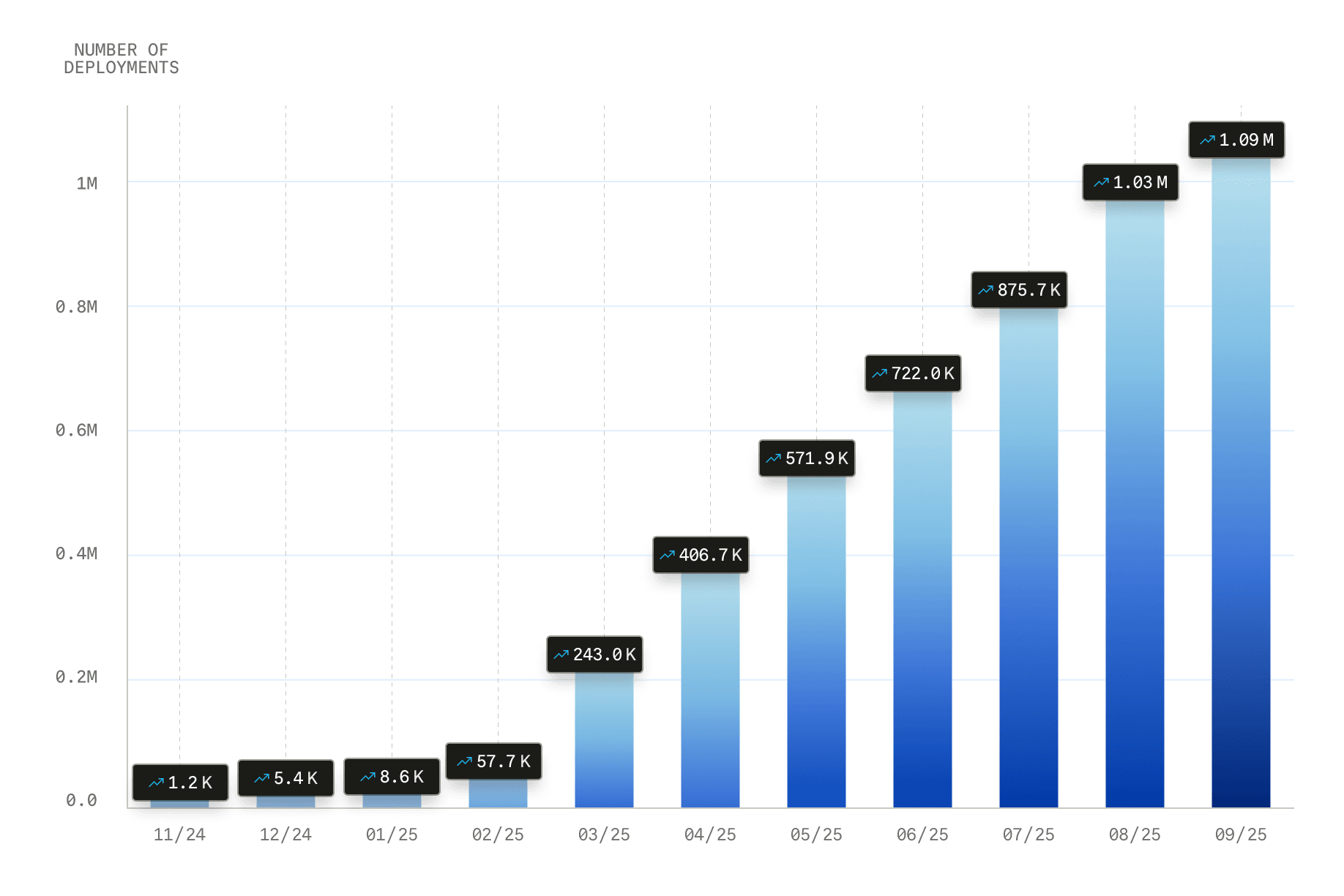 Deployment growth since we launched Laravel Cloud in early access, on November 2024.
In two previous posts, we covered how Laravel Cloud was architected and the choices we made when building its web application.
But launching a platform is only half the story. The other half is everything that happens behind the scenes to support it: real-time billing, a powerful admin interface, and deeply integrated partnerships. This is the infrastructure that quietly powers Laravel Cloud’s one million deployments and counting.
Every developer faces these kinds of problems when scaling up, so we're sharing what we learned: the good decisions, the not-so-good decisions, and what we'd do differently.
Getting Price Right: Billing
Laravel Cloud billing was (and still is) the gift that keeps on giving.
There are so many moving parts to consider. Millions of data points flow in from across our stack: compute, database storage, bandwidth usage, serverless PostgreSQL and key-value store compute, object storage, active users, and more. This system should be resilient, self-healing, and flexible enough to grow with the product.
This is why we built a separate Laravel “billing app” just to collect metrics from every source.
Our goal is near real‑time accuracy. Wherever possible, we pull usage data hourly, format each record as a billing event, and send it to our billing partner, Lago. Early on, we chose event sourcing as our design pattern. It’s one of the design patterns I have not found a good use case for yet, but it’s the perfect fit for our billing journey.
Every metric becomes an immutable event in our store, then projects to Lago in real time. In the future, we may adjust this and, instead, batch the events, or have the events ingested from S3, which would be as “simple” as building out a new projector. If we ever need to correct a logic error, we update the code and replay events. That flexibility has already saved us more than once.
Note: Engineer Dries Vints shared his thoughts on the billing decisions behind Laravel Cloud in this interview.
Earlier, I mentioned resilience and self-healing. What does that mean? Resilience and self‑healing are nonnegotiable. To provide accurate charges, we have to collect all the metrics mentioned above. There is no best effort here. If a third-party API is down or a network glitch occurs, we cannot skip a collection window and proceed. We have to collect when normal service is resumed.
As you may expect, we rely heavily on Laravel’s job functionality to facilitate this. We use Laravel jobs with exponential back‑off retries over 24 hours, sharded queues, rate‑limiting middleware, and timestamps passed in job constructors to ensure the correct period is collected if the job is retried.
As a side note, there is so much gold within Laravel’s jobs, I would highly recommend reading the docs end to end and taking a source dive. I’m sure you’ll find some features you didn’t know existed that you can add to your tool belt.
Admin Panel: Centralizing Customer Support
One thing we wanted to ensure we had in place in time for launch was a fully fleshed-out admin area to aid our Support team in successfully assisting our customers. We mapped out every feature they’d need to diagnose issues and assist customers, then built it all in Laravel Nova, which has all the tools we need (both now and in the future) to create a rich and powerful admin area.
We made it part of the development workflow that any feature we built would have a backoffice equivalent to allow the Support team to access everything they needed to diagnose issues and help to resolve customer issues. One good example is linking out to an individual environment dashboard in Grafana, providing quick access to a more in-depth view of its health.
It would have been easy to deprioritize the admin area in favor of customer‑facing features. Instead, we invested in it pre-launch, let our Support team get hands‑on and familiar with it, avoiding a launch‑day scramble. That foundation has been a key factor in our successful GA.
Integration Partnerships
A first‑class platform needs first‑class partners.
Strategic partnerships are an important part of ensuring Laravel Cloud offers options for all the resources required to support a Laravel application in production. Solid options for PostgreSQL, a Redis-compatible key-value store, and S3-compatible object storage were all things we wanted to provide from launch.
We decided that the best approach to offer all these resources for launch was to work with a set of partners who gave us unwavering confidence in their ability to provide a product that lives up to the high-quality bar we hold ourselves accountable for in Laravel Cloud. Partners that offer competitive pricing. Partners that share our vision. Partners that offer stellar support.
Settling on who to partner with involved numerous calls, extensive testing, and thorough negotiation, all of which were absolutely worth the time investment because we landed on a group of partners who satisfy entirely all of our criteria and more.
Eventually, we chose to work with Neon for serverless PostgreSQL, Upstash for the KV store, and extended our partnership with Cloudflare by utilizing R2 for S3-compatible object storage.
After months of provisioning thousands of resources, we’re very happy with how these integrations perform in production.
Tips for Building a Strong Customer Ecosystem
- Treat billing like a first-class product. Don’t bolt it on. A resilient billing system should scale with your platform, offer near real-time visibility, and handle failure gracefully. Event sourcing can give you flexibility and auditability you’ll thank yourself for later.
- Invest in internal tooling early. A well-equipped support team is your first line of defense post-launch. Build your admin interface as part of your core product workflow, not as an afterthought. Tools like Laravel Nova can make this both fast and future-proof.
- Plan for observability and fallback. Resilience means not dropping data. Use job retries, back-off strategies, and timestamped collections to recover cleanly from outages. Laravel's job system has more power than most developers realize: take the time to explore it.
- Choose integration partners, not just vendors. When every resource your customers depend on is also a reflection of your platform, you need partners who meet your bar for quality, support, and alignment. The right choice here saves you time, money, and customer frustration.
- Think beyond the launch. Your ecosystem should scale with your users. That means designing for self-healing processes, extensible admin tools, and integration points that grow with you, rather than breaking when demand spikes.
Customer Ecosystem: The Backbone of Your App
Laravel Cloud’s incredible customer ecosystem is the result of relentless focus and hard-won lessons.
We built a billing engine that never misses a data point, an admin console that turns Support into a superpower, and partnered with industry leaders to deliver rock‑solid services. This isn’t just infrastructure, but a foundation we built and that our teams can rely on to move fast without fear.
Less than a year after we gave early access to a group of users, we had processed over one million deployments, and every one of those ships thanks to the systems we’ve described.
If you want to see what it feels like to go from code to live in under 30 seconds, give Laravel Cloud a spin and experience all the thought and hard work we put into it.